

Tab Workbench - Local Workspaces
1 rating
)
Overview
Save tab workspaces, leave next-step notes, reopen selected links, export backups and optionally create bookmarks. All locally.
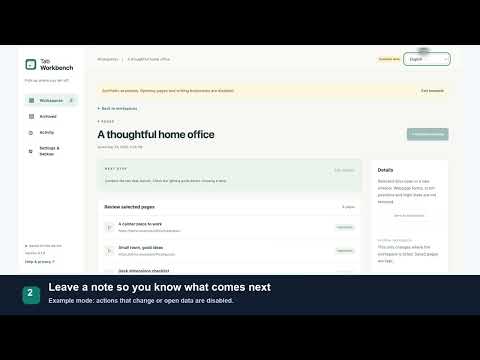
Save tabs for later, organize them into local workspaces, and pick up a task where you left off. Tab Workbench is a tab workspace manager for research, learning and comparing options. Save selected pages with a task name and a next-step note. When you return, review your note and reopen only the links you need. No account or developer cloud backend. A SIMPLE WAY TO PAUSE AND CONTINUE 1. Choose pages from a normal Chrome window. 2. Save a named workspace and a note, such as "compare the last two options". 3. Return later, preview the saved links, and reopen selected pages. Saving a workspace does not automatically close your tabs. WHAT YOU CAN DO - Choose a normal Chrome window, select pages, and save them with a workspace name and note. - Keep page titles, URLs, order, pinned states and tab groups. Saving does not automatically close your original tabs. - Preview a saved workspace before reopening selected links in a new window. Optionally skip exact URLs already open. - Search workspace names, notes and links. Archive completed workspaces and bring them back later. - Export JSON backups. Importing adds copies without replacing existing workspaces or automatically opening pages. - Optionally save selected links into a new bookmark folder. Bookmark access is requested only for this feature; existing bookmarks are not changed, moved or deleted. LOCAL DATA, YOUR CONTROL - No account, ads, analytics service, AI service or developer cloud backend. - Workspaces stay in your current Chrome profile. Titles, URLs, groups and notes are not sent to the developer. - No webpage-body access. Opening a selected link or Help visits the chosen external page normally. - Workspaces do not automatically sync across devices. Export before uninstalling or changing profiles; backup files contain URLs and notes and should be kept private. - Chrome Sync may sync exported bookmarks if you have it enabled. LIMITS TO KNOW Reopening links does not restore form contents, scroll positions or login sessions. Only HTTP/HTTPS pages in normal windows are supported; private windows and internal browser pages are excluded. Requires Chrome 134 or newer. The interface supports English, Simplified Chinese, Traditional Chinese, Spanish, Brazilian Portuguese, Japanese, German and French. Try the built-in synthetic examples first. Example mode lets you inspect the interface without opening pages or writing bookmarks.
5 out of 51 rating
Details
- Version0.1.0
- UpdatedOctober 10, 2026
- Offered by826368166keria
- Size77.94KiB
- Languages8 languages
- Developer王锐刚
金旭路一号 咸阳市, 陕西省 712000 CNEmail
826368166keria@gmail.comPhone
+86 139 2665 7511 - TraderThis developer has identified itself as a trader per the definition from the European Union and committed to only offer products or services that comply with EU laws.
Privacy

Tab Workbench - Local Workspaces has disclosed the following information regarding the collection and usage of your data. More detailed information can be found in the developer's privacy policy.
Tab Workbench - Local Workspaces handles the following:
This developer declares that your data is
- Not being sold to third parties, outside of the approved use cases
- Not being used or transferred for purposes that are unrelated to the item's core functionality
- Not being used or transferred to determine creditworthiness or for lending purposes
Support
For help with questions, suggestions, or problems, please open this page on your desktop browser