

Tab & Window Controller

Overview
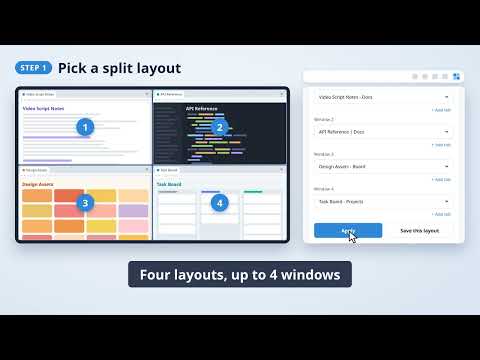
Arrange tabs into split-screen layouts
Too many messy windows getting in the way? Line them up in one click. Tab & Window Controller splits and arranges your Chrome windows into clean layouts. Save the setups you use most, and pick up right where you left off next time. FEATURES - Split layouts: 2 columns, 2 rows, 3 panes, or 4 panes - Flip: swap window positions in one click - Open multiple tabs: set up to 5 tabs per window and open them all at once - Save layouts: keep up to 5 of your go-to setups - Size & position: windows reopen at the same size and position as when you closed them HOW TO USE 1. Click the toolbar icon 2. Choose a layout and hit Apply 3. Save your favorite setups with "+ New layout" GREAT FOR - Writing while keeping reference material in view - Coding side by side with documentation - Anyone who opens the same set of pages every day
0 out of 5No ratings
Details
- Version1.0
- UpdatedSeptember 25, 2026
- Offered byE-RAFT
- Size163KiB
- Languages55 languages
- Developer
Email
info@e-raft.net - Non-traderThis developer has not identified itself as a trader. For consumers in the European Union, please note that consumer rights do not apply to contracts between you and this developer.
Privacy

This developer declares that your data is
- Not being sold to third parties, outside of the approved use cases
- Not being used or transferred for purposes that are unrelated to the item's core functionality
- Not being used or transferred to determine creditworthiness or for lending purposes