

Tab Whiteboard
ExtensionWorkflow & Planning4 users

Overview
Annotate your chrome tabs
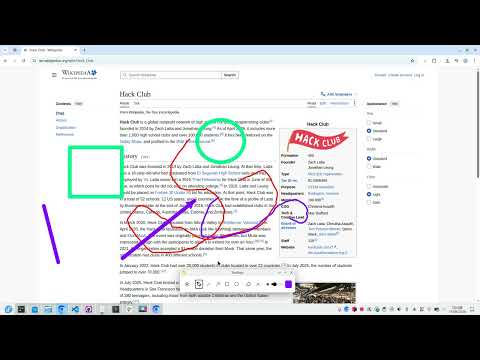
Tab Whiteboard turns any webpage into an interactive canvas. Whether you are delivering a presentation, recording a video tutorial, running a live demo, or reviewing web designs, you can mark up and explain content directly over the active tab without leaving your browser. Features: - Laser pointer (Perfect for presentations) - Freehand pen - Precision Eraser - Geometrical shapes (Lines, Rectangles, Circles, and Arrows) - Easy clear (Remove all annotations in one click) - Touchscreen support - Scrolling support
0 out of 5No ratings
Details
- Version1.0
- UpdatedSeptember 1, 2026
- Offered byHugo H
- Size17.26KiB
- LanguagesEnglish
- Developer
Email
tab-whiteboard.psyj7i@bumpmail.io - Non-traderThis developer has not identified itself as a trader. For consumers in the European Union, please note that consumer rights do not apply to contracts between you and this developer.
Privacy

Manage extensions and learn how they're being used in your organization
The developer has disclosed that it will not collect or use your data. To learn more, see the developer’s privacy policy.
This developer declares that your data is
- Not being sold to third parties, outside of the approved use cases
- Not being used or transferred for purposes that are unrelated to the item's core functionality
- Not being used or transferred to determine creditworthiness or for lending purposes