

Tab Tidy

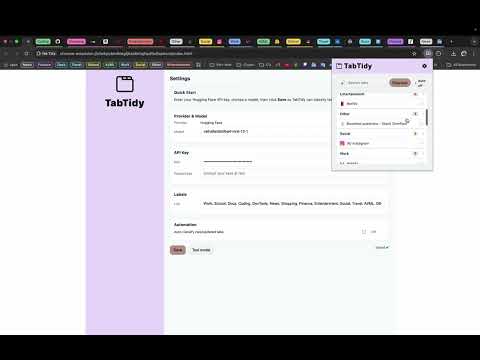
Overview
Auto-categorize and group your tabs using Hugging Face.
Beta notice: This is an early version. Features and grouping quality are evolving, and you may run into rough edges. Feedback is super helpful! Tired of tab chaos? Tab Tidy (AI) organizes your browser in seconds. With one click, it scans open tabs, understands what each tab is about, and groups them into clear, color-coded tab groups—like “Docs,” “Research,” “Social Media,” “Shopping,” or by domain (e.g., github.com, notion.so). No more manual dragging. No more lost context How it works Get a free Hugging Face API key Install the extension. Open Settings(Options) and paste your free Hugging Face API key. Click the Regroup button. What it does? One-click tidy: Instantly create logical tab groups from all windows. Smart AI grouping: Uses tab titles and URLs to infer categories (local processing + lightweight API call). Domain or topic modes: Choose strict domain groups or semantic topics. Custom rules: Pin keywords (e.g., “PR”, “Invoice”, “Leetcode”) to force a group name. Color coding & naming: Clean, readable group names and consistent colors. Per-window control: Tidy the current window or all windows at once. Lightweight & fast: Designed to work smoothly with dozens or hundreds of tabs. Why it’s safe Minimal permissions: tabs, tabGroups, and storage. We read tab titles/URLs to group; we do not read page content. Privacy-first: No behavioral tracking. Settings are stored locally. If AI is enabled, only the tab title/URL needed for grouping is sent to the model provider. Settings you can tweak Minimum tabs to form a group Custom keywords → group names Per-window vs all windows Use “Regroup” if you open a new batch of tabs. Support Questions or ideas? Leave a review. I read them all.
0 out of 5No ratings
Details
- Version0.1.1
- UpdatedNovember 1, 2025
- Offered byroshansajja
- Size1.3MiB
- LanguagesEnglish
- Developer
Email
deadmandevs@gmail.com - Non-traderThis developer has not identified itself as a trader. For consumers in the European Union, please note that consumer rights do not apply to contracts between you and this developer.
Privacy

Tab Tidy has disclosed the following information regarding the collection and usage of your data. More detailed information can be found in the developer's privacy policy.
Tab Tidy handles the following:
This developer declares that your data is
- Not being sold to third parties, outside of the approved use cases
- Not being used or transferred for purposes that are unrelated to the item's core functionality
- Not being used or transferred to determine creditworthiness or for lending purposes