Item logo image for Tab Switcher Ultra – The Best Way to Switch Between Tabs on Chrome

Tab Switcher Ultra – The Best Way to Switch Between Tabs on Chrome

4.5(

12 ratings

)
Item media 5 (screenshot) for Tab Switcher Ultra – The Best Way to Switch Between Tabs on Chrome
Item video thumbnail
Item media 2 (screenshot) for Tab Switcher Ultra – The Best Way to Switch Between Tabs on Chrome
Item media 3 (screenshot) for Tab Switcher Ultra – The Best Way to Switch Between Tabs on Chrome
Item media 4 (screenshot) for Tab Switcher Ultra – The Best Way to Switch Between Tabs on Chrome
Item media 5 (screenshot) for Tab Switcher Ultra – The Best Way to Switch Between Tabs on Chrome
Item video thumbnail
Item media 2 (screenshot) for Tab Switcher Ultra – The Best Way to Switch Between Tabs on Chrome
Item media 3 (screenshot) for Tab Switcher Ultra – The Best Way to Switch Between Tabs on Chrome
Item media 4 (screenshot) for Tab Switcher Ultra – The Best Way to Switch Between Tabs on Chrome
Item media 5 (screenshot) for Tab Switcher Ultra – The Best Way to Switch Between Tabs on Chrome

Overview

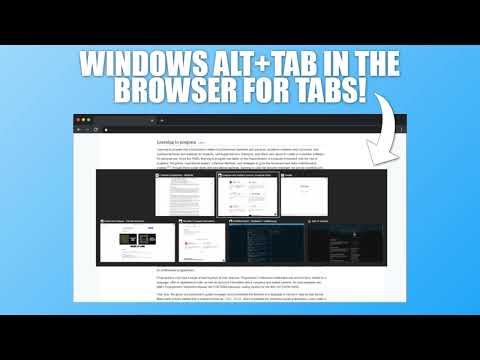
Switch between tabs instantly with an Alt+Tab style interface and keyboard-shortcuts.

To launch the UI, simply hit Alt+Q, and while keeping Alt pressed, move the selector around with the arrow keys, or one-handed with Q to move to the right, and Shift+Q to move to the left. Once you let go of the Alt key, the selected tab will become active. You can also use a mouse and simply click on the tab you want to jump to. All shortcuts are customizable! The default first selected tab when the UI launches will be the previous tab you visited, so if you quickly hit (and release) Alt+Q, you'll jump to your previous tab without using the UI. You can also close tabs via the UI by either hitting the Delete key on the tab you want to close, by clicking on the X-close button for the tab, or by hovering over it and pressing the middle-mouse button (mouse wheel button). Not all pages allow UI's to be rendered in them! For instance, Chrome setting-pages, or even the Chrome Web Store (this page!). In these cases, hitting Alt+Q will simply jump to your previous tab. Tab Switcher Ultra is extremely optimized and performant, is completely ad-free, has zero analytical tools or user-tracking, and usage is 100% private. It's also open-source, is made in Norway/Europe following EU principles, and is made because it's something I've really been wanting for myself, and thought others might like it too! 😀 If you experience any bugs or have feature/change requests, please do not hesitate to get in touch! Links are in the extension menu.

Details

  • Version
    1.2.1
  • Updated
    October 3, 2025
  • Offered by
    TheUllernProject
  • Size
    132KiB
  • Languages
    English
  • Developer
    Email
    theullernproject@gmail.com
  • Non-trader
    This developer has not identified itself as a trader. For consumers in the European Union, please note that consumer rights do not apply to contracts between you and this developer.

Privacy

The developer has disclosed that it will not collect or use your data.

This developer declares that your data is

  • Not being sold to third parties, outside of the approved use cases
  • Not being used or transferred for purposes that are unrelated to the item's core functionality
  • Not being used or transferred to determine creditworthiness or for lending purposes

Support

Related

Swift Tab Switcher

4.6

Use shortcuts to quickly switch your current tab.

Popup Tab Switcher

4.5

Makes switching between tabs more convenient.

Quick Tab Switch

4.8

âš¡ Instantly switch between your two most recent tabs with Alt+Q. Like Alt+Tab for windows, but for Chrome tabs!

Deep Tab Search: Tab Switcher & Search

3.5

Tab manager, tab switcher and search. Fast navigation through open tabs and quick access to information.

Full Screen Tabs

4.1

Enjoy chrome tab navigation in fullscreen — instantly switch & open tabs like normal in chrome kiosk mode with Full Screen Tabs!

Shortcut Tab Switcher

4.5

Shortcut Tab Switcher: tab switcher for handy switching with customizable keyboard hotkeys. Instant switching! 🚀

FreeTabSwitcher

5.0

A free tab switcher that switches between tabs and refreshes pages with profile management. Perfect for displaying dashboards.

QuicKey – The quick tab switcher

4.6

Add keyboard shortcuts to switch tabs via Quicksilver-style search or a most recently used list

Tab Shelf - Side panel vertical tabs

4.3

Vertical tab management from your side panel with support for tab groups, multiple windows, and much more.

Alt Tab Shortcuts

5.0

Speeds up tab management with simple shortcuts

Thinkerer Tab Switcher

5.0

Makes switching tabs easier

TabTap - Clean & Fast Tab Manager

4.7

Search, organize, and manage tabs with ease. Make browsing simple and stress-free.

Swift Tab Switcher

4.6

Use shortcuts to quickly switch your current tab.

Popup Tab Switcher

4.5

Makes switching between tabs more convenient.

Quick Tab Switch

4.8

âš¡ Instantly switch between your two most recent tabs with Alt+Q. Like Alt+Tab for windows, but for Chrome tabs!

Deep Tab Search: Tab Switcher & Search

3.5

Tab manager, tab switcher and search. Fast navigation through open tabs and quick access to information.

Full Screen Tabs

4.1

Enjoy chrome tab navigation in fullscreen — instantly switch & open tabs like normal in chrome kiosk mode with Full Screen Tabs!

Shortcut Tab Switcher

4.5

Shortcut Tab Switcher: tab switcher for handy switching with customizable keyboard hotkeys. Instant switching! 🚀

FreeTabSwitcher

5.0

A free tab switcher that switches between tabs and refreshes pages with profile management. Perfect for displaying dashboards.

QuicKey – The quick tab switcher

4.6

Add keyboard shortcuts to switch tabs via Quicksilver-style search or a most recently used list

Google apps