


Overview
Centralized tab manager: sort, move, dedupe, read later, and saved windows. 100% local.
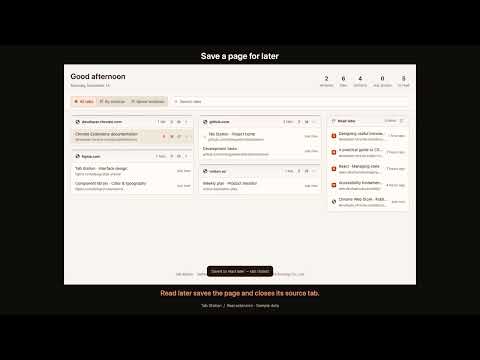
Tab Station brings tabs from all your windows into one manager page, helping you find, organize, set aside, and restore your browsing tasks. Manage your actual browser tabs View tabs across windows and click to switch to them. Drag to rearrange tabs, move them between windows, split them into a new window, or close them. Your changes apply directly to the actual tabs in Chrome. Three ways to organize All Tabs: group tabs by domain across windows. By Window: view tabs in their browser windows and existing order. Saved Windows: save browsing tasks and restore them when needed. Find tabs quickly Search open tabs by title or URL. In the Chrome address bar, type ts, press Tab, and enter a keyword to search open tabs, Read Later items, and Saved Windows. Remove duplicate tabs Identify duplicate URLs, preview which tabs will be kept or closed, and remove duplicates. Pinned tabs take priority when choosing what to keep. Read Later Set a page aside and close its original tab. Opening it from Read Later automatically removes it from the list. Reusable Saved Windows Save a window as a snapshot. Rename it, rearrange its items, open individual pages, or remove items. Restoring a Saved Window keeps the snapshot available for future use. Local data and clear permission use The extension reads tab titles, URLs, site icons, and window information to display, search, and organize browsing tasks. Settings, Read Later items, and Saved Windows are stored locally in Chrome extension storage and are not uploaded to developer servers. There is no account login, advertising, or analytics service. Displaying site icons may request images from the corresponding icon servers. Choose a light, dark, or system theme. The interface supports English, Simplified Chinese, French, Japanese, Korean, and Russian. Click the extension icon to open the manager page, or use the default shortcut: Ctrl+Shift+E on Windows/Linux or Command+Shift+E on macOS. Shortcuts can be changed in Chrome's extension shortcut settings. Tab Station does not replace your new tab page. Please note: actions in the manager affect your actual browser tabs. Save any work in progress before closing tabs or removing duplicates.
0 out of 5No ratings
Details
- Version0.4.0
- UpdatedNovember 14, 2026
- Size246KiB
- Languages6 languages
- DeveloperWebsite
Email
kangljchn@gmail.com - Non-traderThis developer has not identified itself as a trader. For consumers in the European Union, please note that consumer rights do not apply to contracts between you and this developer.
Privacy

Tab Station has disclosed the following information regarding the collection and usage of your data. More detailed information can be found in the developer's privacy policy.
Tab Station handles the following:
This developer declares that your data is
- Not being sold to third parties, outside of the approved use cases
- Not being used or transferred for purposes that are unrelated to the item's core functionality
- Not being used or transferred to determine creditworthiness or for lending purposes
Support
For help with questions, suggestions, or problems, visit the developer's support site