Item logo image for Tab Spotlight Search

Tab Spotlight Search

Item media 3 (screenshot) for Tab Spotlight Search
Item video thumbnail
Item media 2 (screenshot) for Tab Spotlight Search
Item media 3 (screenshot) for Tab Spotlight Search
Item video thumbnail
Item media 2 (screenshot) for Tab Spotlight Search
Item media 3 (screenshot) for Tab Spotlight Search

Overview

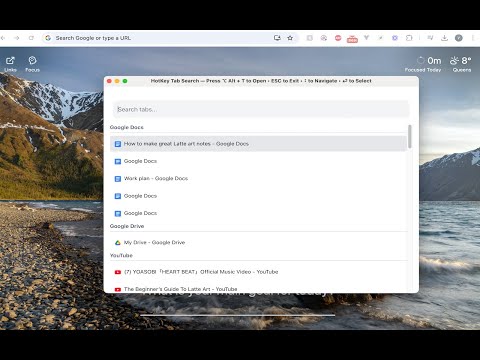
Inspired from mac spotlight search, search tab easily with hotkeys option + T

Quickly search and switch between tabs with a keyboard shortcut. Lightweight, minimal, and built for speed. * added functionality in V 1.1: domain search, provide better and accurate response for searching tab

Details

  • Version
    1.1.1
  • Updated
    October 19, 2025
  • Offered by
    Duckkitten
  • Size
    95.18KiB
  • Languages
    English (United States)
  • Developer
    Email
    yichen.luu@gmail.com
  • Non-trader
    This developer has not identified itself as a trader. For consumers in the European Union, please note that consumer rights do not apply to contracts between you and this developer.

Privacy

The developer has disclosed that it will not collect or use your data.

This developer declares that your data is

  • Not being sold to third parties, outside of the approved use cases
  • Not being used or transferred for purposes that are unrelated to the item's core functionality
  • Not being used or transferred to determine creditworthiness or for lending purposes

Related

Duplicate Tab Shortcut

4.9

Press Alt+Shift+D to duplicate the current tab (Option+Shift+D on Mac). Shortcut is configurable.

Faster Top Bookmark - Add Bookmark faster

5.0

Easily add bookmarks to the top of any folder. Includes spotlight-like search with mouse/kb support. Default key: ⌘+b (win:ctrl+b).

Tab Manager v2

4.1

Quickly and conveniently manage your open tabs

Lightweight Tab Search

4.8

Quick way to navigate through tabs!

Vertical Tabs & Bookmarks

4.5

Vertical grouping of tabs, quick search in favorites and in the history of page views

智能搜索引擎切换器

5.0

一个功能丰富的搜索引擎切换插件,支持多种搜索引擎、快捷键切换、搜索历史等功能

探索者小舒 - 强大快捷的侧栏搜索切换工具

4.5

强大快捷的侧栏搜索切换工具

Tab-Manager

4.0

A basic tab manager that allows you to find or navigate to tabs quickly.

Quick Tab Search

5.0

Quickly search and switch between open tabs

Smart Tab Switcher

5.0

Fast tab switching and management with fuzzy search and keyboard shortcuts

Pin/Unpin Tab Shortcut Ctrl/Command + Shift + P

3.0

Pin or unpin the current tab with Ctrl+Shift+P (Windows) or Command+Shift+P (macOS).

Bookmarks Quick Search

4.6

Search bookmarks quickly and easily, with a search popup, which can be opened by a click on the extension logo (or by cmd+E/ctrl+W).

Duplicate Tab Shortcut

4.9

Press Alt+Shift+D to duplicate the current tab (Option+Shift+D on Mac). Shortcut is configurable.

Faster Top Bookmark - Add Bookmark faster

5.0

Easily add bookmarks to the top of any folder. Includes spotlight-like search with mouse/kb support. Default key: ⌘+b (win:ctrl+b).

Tab Manager v2

4.1

Quickly and conveniently manage your open tabs

Lightweight Tab Search

4.8

Quick way to navigate through tabs!

Vertical Tabs & Bookmarks

4.5

Vertical grouping of tabs, quick search in favorites and in the history of page views

智能搜索引擎切换器

5.0

一个功能丰富的搜索引擎切换插件,支持多种搜索引擎、快捷键切换、搜索历史等功能

探索者小舒 - 强大快捷的侧栏搜索切换工具

4.5

强大快捷的侧栏搜索切换工具

Tab-Manager

4.0

A basic tab manager that allows you to find or navigate to tabs quickly.

Google apps