

Tab Spotlight Search: Cross-window Tab Search, Navigation and Management
3 ratings
)
Overview
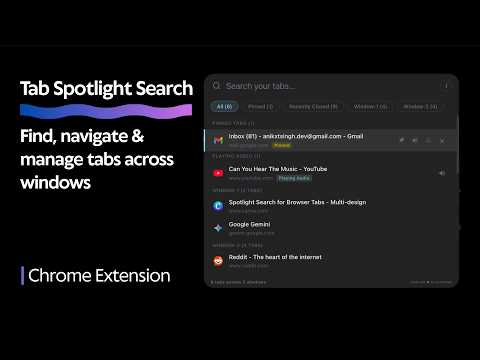
Search, Navigate & Manage Tabs Across Windows Instantly. #NoTabLeftBehind
WHAT IT DOES - Instantly search tabs across multiple windows - Jump across tabs using just your keyboard - Make a quick search on a new tab - Pin important tabs to the top - Move an open tab to a new window - Re-open recently closed tabs - Find & Mute noisy tabs fast HOW IT WORKS Open / Close: Ctrl + K (Can Customise this, See YT Tutorial) Navigate Tabs: Up/Down Arrow Keys ↑ / ↓ Navigate Windows: Left/Right Arrow Keys ← / → Switch to tab: Enter Close tab: Delete Exit: Esc QUICK ACTIONS Pin / Unpin → Ctrl + 1 Mute / Unmute → Ctrl + 2 Move to new window → Ctrl + 3 No tracking, everything runs locally. PLEASE NOTE Tab Spotlight Search is designed to work only on website tabs, it will not work on a new empty tab or a local tab (localhost, chrome://, etc). You can change the keyboard shortcut to open/close Tab Spotlight Search by going to chrome://extensions/shortcuts
5 out of 53 ratings
Details
- Version1.2.0
- UpdatedMarch 2, 2026
- Offered byanikxtsingh
- Size38.21KiB
- LanguagesEnglish
- Developer
Email
anikxtsingh.dev@gmail.com - Non-traderThis developer has not identified itself as a trader. For consumers in the European Union, please note that consumer rights do not apply to contracts between you and this developer.
Privacy

This developer declares that your data is
- Not being sold to third parties, outside of the approved use cases
- Not being used or transferred for purposes that are unrelated to the item's core functionality
- Not being used or transferred to determine creditworthiness or for lending purposes