


Przegląd
Keep your tabs ordered by their most recent usage.
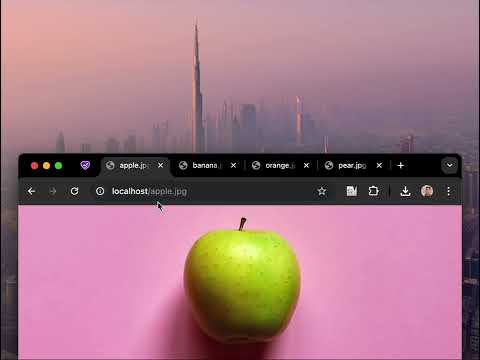
🔥 BOOST YOUR BROWSING EXPERIENCE! 🔥 This extension keeps your browser tabs sorted in Most Recently Used (MRU) order, from left to right — just like the way apps are organized on desktop operating systems when you use Cmd/Alt+Tab. Tab Slider brings this behavior to Chrome. Try it out! How it works: - If you stay on a tab for more than 1 second (by default), it will "slide" to the leftmost position; - This keeps your most recently used tabs ordered from left to right; - Thanks to this order, pressing Ctrl+Tab switches you to the next most recently used tab; - Pinned tabs slide in the opposite direction (left to right). This is intentional — it allows seamless switching between your most recently used pinned tabs and normal tabs using keyboard shortcuts: - Ctrl+Shift+Tab switches to the most recently used pinned tab; - Ctrl+Tab switches back to the most recently used normal tab; You can customize the reordering delay and the maximum number of reordered tabs in the extension’s settings; newly opened active tabs immediately appear on the left. Once you get used to it, this way of managing tabs will feel completely natural and intuitive 🪄
4,5 na 514 ocen
Szczegóły
- Wersja2.1
- Zaktualizowano9 lipca 2025
- Rozmiar17.75KiB
- JęzykiEnglish
- DeweloperWitryna
E-mail
me@nikitaeverywhere.com - Osoba niebędąca przedsiębiorcąTen deweloper nie określił, że jest przedsiębiorcą. Pamiętaj, że prawa konsumentów nie obowiązują w przypadku umów zawartych między tym deweloperem a konsumentami z Unii Europejskiej.
Prywatność

Ten wydawca oświadcza, że Twoje dane
- nie są sprzedawane osobom trzecim (z wyjątkiem uzasadnionych przypadków)
- nie są używane ani przesyłane w celach niezwiązanych z podstawową funkcją produktu,
- nie są używane ani przesyłane w celu ustalenia zdolności kredytowej lub udzielania pożyczek.
Pomoc
Jeśli masz pytania, sugestie lub problemy, otwórz tę stronę w przeglądarce na komputerze