

Tab Slider

Обзор
Keep your tabs ordered by their most recent usage.
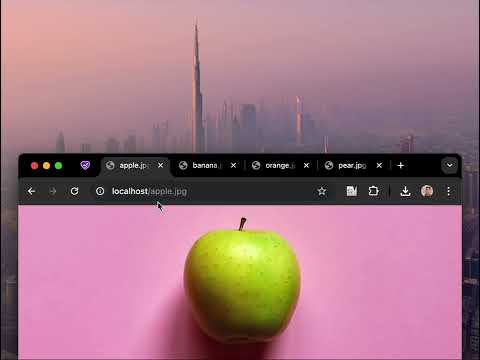
🔥 BOOST YOUR BROWSING EXPERIENCE! 🔥 This extension keeps your browser tabs sorted in Most Recently Used (MRU) order, from left to right — just like the way apps are organized on desktop operating systems when you use Cmd/Alt+Tab. Tab Slider brings this behavior to Chrome. Try it out! How it works: - If you stay on a tab for more than 1 second (by default), it will "slide" to the leftmost position; - This keeps your most recently used tabs ordered from left to right; - Thanks to this order, pressing Ctrl+Tab switches you to the next most recently used tab; - Pinned tabs slide in the opposite direction (left to right). This is intentional — it allows seamless switching between your most recently used pinned tabs and normal tabs using keyboard shortcuts: - Ctrl+Shift+Tab switches to the most recently used pinned tab; - Ctrl+Tab switches back to the most recently used normal tab; You can customize the reordering delay and the maximum number of reordered tabs in the extension’s settings; newly opened active tabs immediately appear on the left. Once you get used to it, this way of managing tabs will feel completely natural and intuitive 🪄
4,5 из 514 оценок
Подробности
- Версия2.1
- Обновлено9 июля 2025 г.
- Размер17.75KiB
- ЯзыкиEnglish
- РазработчикСайт
Электронная почта
me@nikitaeverywhere.com - Не продавецРазработчик не указал для себя статус продавца. Просим клиентов из Европейского союза обратить внимание, что на сделки между вами и этим разработчиком не распространяются законы о защите прав потребителей.
Конфиденциальность

Этот разработчик утверждает, что ваши данные:
- Не продаются третьим лицам, за исключением разрешенных вариантов использования
- Не используются и не передаются в целях, не связанных с работой основных функций продукта
- Не используются и не передаются для определения платежеспособности или в целях кредитования
Поддержка
Чтобы сообщить об ошибках в работе продукта, задать вопрос или поделиться идеями, откройте эту страницу в браузере для компьютера.