


Pangkalahatang-ideya
Keep your tabs ordered by their most recent usage.
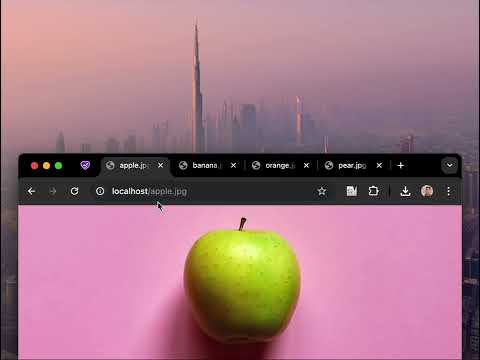
🔥 BOOST YOUR BROWSING EXPERIENCE! 🔥 This extension keeps your browser tabs sorted in Most Recently Used (MRU) order, from left to right — just like the way apps are organized on desktop operating systems when you use Cmd/Alt+Tab. Tab Slider brings this behavior to Chrome. Try it out! How it works: - If you stay on a tab for more than 1 second (by default), it will "slide" to the leftmost position; - This keeps your most recently used tabs ordered from left to right; - Thanks to this order, pressing Ctrl+Tab switches you to the next most recently used tab; - Pinned tabs slide in the opposite direction (left to right). This is intentional — it allows seamless switching between your most recently used pinned tabs and normal tabs using keyboard shortcuts: - Ctrl+Shift+Tab switches to the most recently used pinned tab; - Ctrl+Tab switches back to the most recently used normal tab; You can customize the reordering delay and the maximum number of reordered tabs in the extension’s settings; newly opened active tabs immediately appear on the left. Once you get used to it, this way of managing tabs will feel completely natural and intuitive 🪄
4.5 sa 514 na rating
Mga Detalye
- Bersyon2.1
- Na-updateHulyo 9, 2025
- Laki17.75KiB
- Mga WikaEnglish
- DeveloperWebsite
Email
me@nikitaeverywhere.com - Hindi traderHindi tinukoy ng developer na ito ang sarili bilang trader. Para sa mga consumer sa European Union, pakitandaang hindi naaangkop ang mga karapatan ng consumer sa mga kontrata sa pagitan mo at ng developer na ito.
Privacy

Ipinapahayag ng developer na ito na ang iyong data ay
- Hindi ibinebenta sa mga third party na hindi kabilang sa mga naaprubahang sitwasyon ng paggamit
- Hindi ginagamit o inililipat para sa mga layuning hindi nauugnay sa pangunahing functionality ng item
- Hindi ginagamit o inililipat para tukuyin ang pagiging creditworthy o para sa mga layunin ng pagpapautang
Suporta
Para sa tulong sa mga tanong, suhestyon, o problema, pakibuksan ang page na ito sa iyong desktop browser