

Tab Reloader (page auto refresh)

Tổng quan
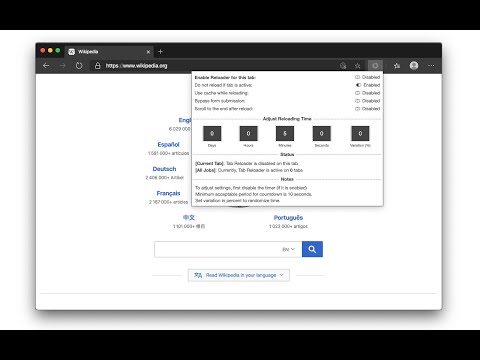
An easy-to-use tab reloader with custom reloading time for individual tabs and more!
Tab reloader provides a toolbar panel to perform infinite reloading jobs on individual tabs. You can define a custom period with a random variation for each tab. Tab reloading jobs can be disabled or enabled through the toolbar panel. Preview: https://www.youtube.com/watch?v=zAhQlorZZTc Features: 1. Define variable (random) reloading times with a predefined range 2. Define whether reloading occurs when a tab is active or not 3. Restores reloading jobs after a restart (session manager) 4. Reload tabs from the context menu over tab element (see screenshot) 5. Optionally displays the remaining time of the next reloading on the badge area 6. See the list of all tabs with active reloading jobs in the browser action's popup 7. Set custom rules to start reloading a tab when URL or hostname matches. 8. Optionally move to the bottom of a tab after reloading occurs to read the new content 9. Reload all tabs in the current window or all browser windows 10. Reload local files (file://) 11. Optionally bypass form submissions 12. Define a policy that prevents reloading based on the time (date) and URL 13. Run custom JavaScript code on each reload. 14. Reload only a few times and then stop. 15. Reload discarded tabs in the current window or all windows 16. Supports setting reloading jobs of all selected tabs at once To disable an already activated tab, please make sure to switch to the tab first, then open the toolbar button and disable the job. Note that if you are closing the tab, there is no need to disable the job. The job will be disabled automatically after an active tab gets closed. As of version 0.2.7, you can now ask the extension to automatically set new reloading jobs for you based on the "Custom JSON" object. If the option is checked and the new page has a matching hostname, the extension will load the custom reloading job from the JSON and applies to the tab. Check the options and FAQs pages for more info. As of version 0.2.9, 1 you can define a policy that prevents reloading based on the time (date) and URL. Both time and URL keys accept regular expressions to prevent reloading. With the policies you can, for instance, prevent reloading on a specific page of a domain or prevent reloading at specific hours of a day.
4,2/5161 lượt xếp hạng
Chi tiết
- Phiên bản0.6.6
- Đã cập nhật21 tháng 7, 2025
- Nhà cung cấptlintspr
- Kích thước613KiB
- Ngôn ngữ7 ngôn ngữ
- Nhà phát triển
Email
tlintspr@gmail.com - Người bán phi thương mạiNhà phát triển này không tự nhận mình là người bán. Đối với người tiêu dùng ở Liên minh Châu Âu, xin lưu ý rằng các quyền của người tiêu dùng không được áp dụng trong hợp đồng giữa bạn và nhà phát triển này.
Quyền riêng tư

Nhà phát triển này tuyên bố rằng dữ liệu của bạn
- Không được bán cho bên thứ ba, ngoài những trường hợp sử dụng đã được phê duyệt
- Không được sử dụng hoặc chuyển nhượng cho các mục đích không liên quan đến chức năng chính của mặt hàng
- Không được sử dụng hoặc chuyển nhượng để xác định khả năng thanh toán nợ hoặc phục vụ mục đích cho vay
Hỗ trợ
Nếu bạn có câu hỏi, ý kiến đề xuất hoặc gặp vấn đề, hãy truy cập trang web hỗ trợ của nhà phát triển để được trợ giúp