


Pangkalahatang-ideya
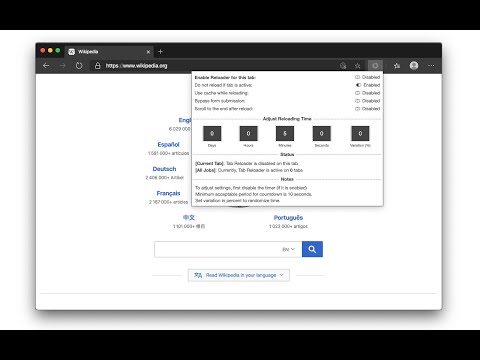
An easy-to-use tab reloader with custom reloading time for individual tabs and more!
Tab reloader provides a toolbar panel to perform infinite reloading jobs on individual tabs. You can define a custom period with a random variation for each tab. Tab reloading jobs can be disabled or enabled through the toolbar panel. Preview: https://www.youtube.com/watch?v=zAhQlorZZTc Features: 1. Define variable (random) reloading times with a predefined range 2. Define whether reloading occurs when a tab is active or not 3. Restores reloading jobs after a restart (session manager) 4. Reload tabs from the context menu over tab element (see screenshot) 5. Optionally displays the remaining time of the next reloading on the badge area 6. See the list of all tabs with active reloading jobs in the browser action's popup 7. Set custom rules to start reloading a tab when URL or hostname matches. 8. Optionally move to the bottom of a tab after reloading occurs to read the new content 9. Reload all tabs in the current window or all browser windows 10. Reload local files (file://) 11. Optionally bypass form submissions 12. Define a policy that prevents reloading based on the time (date) and URL 13. Run custom JavaScript code on each reload. 14. Reload only a few times and then stop. 15. Reload discarded tabs in the current window or all windows 16. Supports setting reloading jobs of all selected tabs at once To disable an already activated tab, please make sure to switch to the tab first, then open the toolbar button and disable the job. Note that if you are closing the tab, there is no need to disable the job. The job will be disabled automatically after an active tab gets closed. As of version 0.2.7, you can now ask the extension to automatically set new reloading jobs for you based on the "Custom JSON" object. If the option is checked and the new page has a matching hostname, the extension will load the custom reloading job from the JSON and applies to the tab. Check the options and FAQs pages for more info. As of version 0.2.9, 1 you can define a policy that prevents reloading based on the time (date) and URL. Both time and URL keys accept regular expressions to prevent reloading. With the policies you can, for instance, prevent reloading on a specific page of a domain or prevent reloading at specific hours of a day.
4.2 sa 5165 rating
Mga Detalye
- Bersyon0.6.7
- Na-updateAbril 4, 2026
- Iniaalok ngtlintspr
- Laki607KiB
- Mga Wika7 (na) wika
- Developer
Email
tlintspr@gmail.com - Hindi traderHindi tinukoy ng developer na ito ang sarili bilang trader. Para sa mga consumer sa European Union, pakitandaang hindi naaangkop ang mga karapatan ng consumer sa mga kontrata sa pagitan mo at ng developer na ito.
Privacy

Ipinapahayag ng developer na ito na ang iyong data ay
- Hindi ibinebenta sa mga third party na hindi kabilang sa mga naaprubahang sitwasyon ng paggamit
- Hindi ginagamit o inililipat para sa mga layuning hindi nauugnay sa pangunahing functionality ng item
- Hindi ginagamit o inililipat para tukuyin ang pagiging creditworthy o para sa mga layunin ng pagpapautang
Suporta
Para sa tulong sa mga tanong, suhestyon, o problema, bisitahin ang site ng suporta ng developer