

Tab Reloader (page auto refresh)

Обзор
Удобная перезагрузка вкладок с настраиваемым временным интервалом для отдельных вкладок и многое другое!
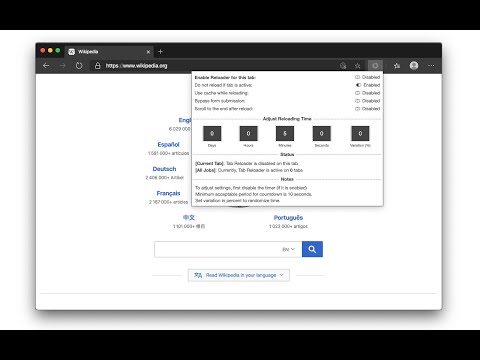
Tab reloader provides a toolbar panel to perform infinite reloading jobs on individual tabs. You can define a custom period with a random variation for each tab. Tab reloading jobs can be disabled or enabled through the toolbar panel. Preview: https://www.youtube.com/watch?v=zAhQlorZZTc Features: 1. Define variable (random) reloading times with a predefined range 2. Define whether reloading occurs when a tab is active or not 3. Restores reloading jobs after a restart (session manager) 4. Reload tabs from the context menu over tab element (see screenshot) 5. Optionally displays the remaining time of the next reloading on the badge area 6. See the list of all tabs with active reloading jobs in the browser action's popup 7. Set custom rules to start reloading a tab when URL or hostname matches. 8. Optionally move to the bottom of a tab after reloading occurs to read the new content 9. Reload all tabs in the current window or all browser windows 10. Reload local files (file://) 11. Optionally bypass form submissions 12. Define a policy that prevents reloading based on the time (date) and URL 13. Run custom JavaScript code on each reload. 14. Reload only a few times and then stop. 15. Reload discarded tabs in the current window or all windows To disable an already activated tab, please make sure to switch to the tab first, then open the toolbar button and disable the job. Note that if you are closing the tab, there is no need to disable the job. The job will be disabled automatically after an active tab gets closed. As of version 0.2.7, you can now ask the extension to automatically set new reloading jobs for you based on the "Custom JSON" object. If the option is checked and the new page has a matching hostname, the extension will load the custom reloading job from the JSON and applies to the tab. Check the options and FAQs pages for more info. As of version 0.2.9, 1 you can define a policy that prevents reloading based on the time (date) and URL. Both time and URL keys accept regular expressions to prevent reloading. With the policies you can, for instance, prevent reloading on a specific page of a domain or prevent reloading at specific hours of a day.
4,2 из 5161 оценка
Подробности
- Версия0.6.6
- Обновлено21 июля 2025 г.
- Автор:tlintspr
- Размер613KiB
- ЯзыкиПоддерживаемых языков: 7
- Разработчик
Электронная почта
tlintspr@gmail.com - Не продавецРазработчик не указал для себя статус продавца. Просим клиентов из Европейского союза обратить внимание, что на сделки между вами и этим разработчиком не распространяются законы о защите прав потребителей.
Конфиденциальность

Этот разработчик утверждает, что ваши данные:
- Не продаются третьим лицам, за исключением разрешенных вариантов использования
- Не используются и не передаются в целях, не связанных с работой основных функций продукта
- Не используются и не передаются для определения платежеспособности или в целях кредитования
Поддержка
Сообщить об ошибках в работе приложения, задать вопрос или поделиться идеями можно на сайте разработчика.