

Tab Relief — Sleep Tabs & Memory Saver

Overview
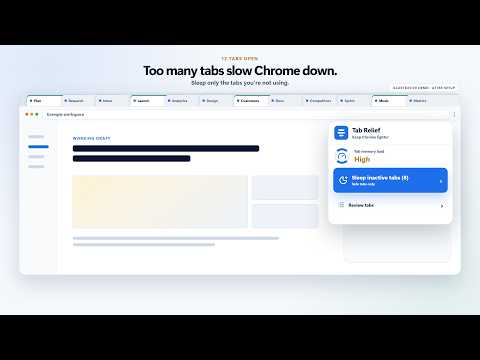
Sleep inactive tabs, save windows as workspaces, and clear tab clutter — Chrome stays fast without losing your place.
Too many tabs can make Chrome feel slow, but closing them can disrupt your work. Tab Relief helps reduce memory use by resting inactive tabs while keeping them available. WHAT IT DOES • Sleep inactive tabs — rest safe background tabs with Chrome's native tab discard feature. Tabs reload automatically when you return. • Auto Sleep — choose an interval and let Tab Relief quietly rest eligible inactive tabs. • Workspaces — save a window as a named workspace and restore the tabs later, including their tab groups. • Close matching tabs — find tabs by site or keyword, check the match count, and close them with a separate action. • Protected sites — keep selected domains out of Auto Sleep and rule-based cleanup. SAFE BY DEFAULT Active tabs, pinned tabs, tabs playing audio, local pages, and protected domains stay awake during automatic cleanup. Before resting tabs, Tab Relief shows the eligible tab count and an estimated memory relief. Closing tabs always requires a separate, explicit action. PRICING Tab Relief is free to install. Each email address can use one 14-day free trial. No card is required, and the trial does not convert automatically to a paid subscription. After the trial, you can choose $1.30/month or $12.99/year. Open Billing inside the extension to manage or cancel your subscription. PRIVACY Settings and workspaces are stored locally on your device. Tab Relief reads tab titles, URLs, and states only to decide which tabs can be rested, saved, protected, restored, or closed. Tab Relief does not sell or share your browsing data. Payments are handled by ExtensionPay and Stripe; card details are never stored by the extension.
4.5 out of 52 ratings
Details
- Version0.1.14
- UpdatedAugust 5, 2026
- FeaturesOffers in-app purchases
- Size91.08KiB
- Languages2 languages
- Developer鎌田昂輝Website
青葉区八幡3丁目17−20 エルスタンザ仙台八幡 305 仙台市, 宮城県 980-0871 JPEmail
subaruu0130@gmail.comPhone
+81 90-9840-1473 - TraderThis developer has identified itself as a trader per the definition from the European Union and committed to only offer products or services that comply with EU laws.
Privacy

This developer declares that your data is
- Not being sold to third parties, outside of the approved use cases
- Not being used or transferred for purposes that are unrelated to the item's core functionality
- Not being used or transferred to determine creditworthiness or for lending purposes