

Tab Rehab

Overview
Recovery for chronic tab hoarders. See, search, park and turn your tabs into to-dos.
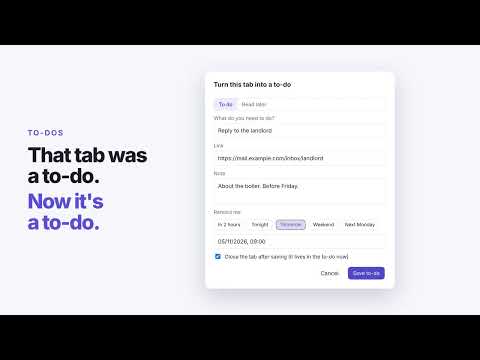
Hi. I have 347 tabs open. If that sounds familiar, welcome. Tab Rehab is recovery for chronic tab hoarders. One tab at a time. You don't keep tabs open because you like clutter. You keep them because you're afraid of losing them, and because half of them are secretly a to-do list. Tab Rehab answers that fear: everything you close can be undone, parked, snoozed or turned into a to-do. Nothing gets lost. WHAT IT DOES • See every tab in one dashboard, grouped by site or window. Search with "/". • Rehab session: one tab at a time, oldest first. Keep (K), To-do (T), Snooze (S), Bookmark (B), Park (P) or Close (C). • Quick wins: close duplicates, empty tabs, old searches and error pages in one click. • Stale tabs: find what you haven't opened in 1 to 30 days and park it all at once. • Park: save tabs to a list and close them. Restore them later, back into the window they came from. • Snooze: close a tab now and have it reopen by itself tonight, tomorrow or next week. • To-dos: turn "I kept this open so I don't forget" into a note with a reminder. • Bookmarks: save tabs worth keeping for good, in the folder you choose. • Recovery: your own progress. "You started at 347. Today: 41." and "You've let go of 812 tabs. You needed 6 back." • Tab count on the toolbar icon (green, amber, red), right-click to park or save as to-do, Alt+Shift+T to open. SAFETY NET • Undo after every close, park or to-do. • "Recently closed" log of everything Tab Rehab closed. • Asks before parking more than 10 tabs. • Export and import a JSON backup any time. PRIVACY What happens in rehab stays in rehab. Everything is stored on your device. No accounts, no servers, no analytics, no telemetry. Tab Rehab never sends your tabs, URLs or anything else anywhere. Works in Chrome, Edge, Brave and Arc. Free and open source: github.com/jorgesousa/tab-rehab Built by Jorge Sousa.
0 out of 5No ratings
Details
- Version0.3.0
- UpdatedNovember 9, 2026
- Offered byjorgesous@gmail.com
- Size36.06KiB
- LanguagesEnglish
- Developer
Email
jorgesous@gmail.com - Non-traderThis developer has not identified itself as a trader. For consumers in the European Union, please note that consumer rights do not apply to contracts between you and this developer.
Privacy

This developer declares that your data is
- Not being sold to third parties, outside of the approved use cases
- Not being used or transferred for purposes that are unrelated to the item's core functionality
- Not being used or transferred to determine creditworthiness or for lending purposes
Support
For help with questions, suggestions, or problems, visit the developer's support site