


Overview
Tab manager that closes duplicate, stale and unused tabs in a swipe, parks tabs for later and sorts the rest into AI tab groups.
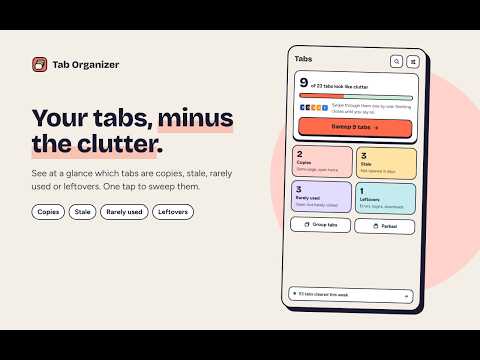
Too many tabs? Tab Organizer finds the clutter and lets you clear it in seconds, without losing anything you still need. SEE THE CLUTTER AT A GLANCE • Copies: the same page open twice (tracking junk in the address is ignored) • Stale: tabs you haven't opened in days • Rarely used: opened once, barely looked at • Leftovers: error pages, finished sign-ins, handled downloads SWEEP IT LIKE A CARD DECK Swipe left to close, down to park, right to keep. Arrow keys work too. Nothing closes until you say so, and every action can be undone. PARK TABS FOR LATER Park a set of tabs as one stack and bring them all back in one click. AI STACKS Group loose tabs, or regroup everything, into named Chrome tab groups. Preview first: rename, move or skip a stack before anything changes. Use the free built-in AI, your own Gemini, OpenAI, Anthropic or OpenRouter key, or no AI at all. STAYS TIDY ON ITS OWN Optional rules: close copies right away, sleep idle tabs to save memory, park stale tabs, cap your tab count, and get a gentle weekly sweep reminder. FIND ANY TAB Press Ctrl+Shift+K (Cmd+Shift+K on Mac) and type. PRIVATE BY DESIGN Your visit history and parked tabs stay on your computer, and Incognito pages are never recorded. No account, no ads, no tracking. Only AI grouping sends tab titles and host names (like docs.google.com), and only to the AI you picked.
0 out of 5No ratings
Details
- Version1.0.2
- UpdatedNovember 2, 2026
- Size198KiB
- LanguagesEnglish
- DeveloperWebsite
Email
abhishekt07.cr@gmail.com - Non-traderThis developer has not identified itself as a trader. For consumers in the European Union, please note that consumer rights do not apply to contracts between you and this developer.
Privacy

Tab Organizer: Close Duplicate Tabs & AI Tab Groups has disclosed the following information regarding the collection and usage of your data. More detailed information can be found in the developer's privacy policy.
Tab Organizer: Close Duplicate Tabs & AI Tab Groups handles the following:
This developer declares that your data is
- Not being sold to third parties, outside of the approved use cases
- Not being used or transferred for purposes that are unrelated to the item's core functionality
- Not being used or transferred to determine creditworthiness or for lending purposes