


Overview
Monitor your tabs and reclaim your RAM.
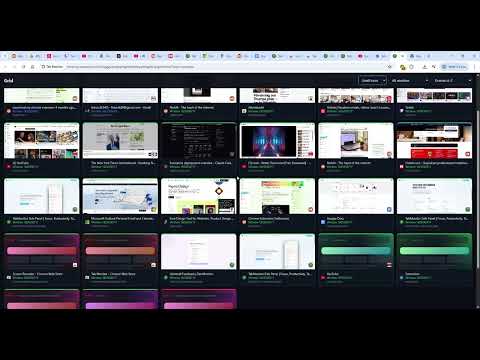
Tab Monitor: Real-Time Resource Management Monitor your tabs. Reclaim your RAM. ======================================= Tab Monitor provides a granular, real-time dashboard of your browser’s performance. Instead of guessing which tab is slowing down your system, see exact RAM and CPU metrics for every open window and terminate resource-heavy processes with a single click. Key Features: ------------------------------------------- * Real-Time Metrics: RAM and CPU usage per tab, refreshed every 3 seconds. * Resource Status: Instant visual feedback using Green (Healthy), Yellow (Warning), and Red (Critical) indicators. * Focus Mode: Whitelist specific tabs and block new distractions for a set duration. * Bulk Management: "Clear the Room" allows you to close all critical resource hogs simultaneously. * Safety Net: Automatic session saving every 5 minutes to prevent data loss during crashes. * Privacy-Centric: All metrics stay 100% local. No telemetry, no tracking, and no account required for core features. Tab Monitor PRO: ------------------------------------------- * Customizable Focus Mode * Grid View - get an overview of your tabs in a new way * More back-up sessions in cause of browser crash * Automated Suspensions: Automatically offload inactive, high-RAM tabs after 10 minutes. * Leak Detection: Smart alerts for tabs with abnormally fast memory growth. * The Parking Lot: Temporarily hibernate tabs and restore them later with full context with reminders if needed. * Custom Thresholds: Set domain-specific limits for "Critical" status alerts. * Advanced Analytics: Trend tracking and memory peak breakdowns by domain. Changelog =============== Update 1.0.9 – May 6 2026 ------------------------------------------------- Functionality: Fixed visual bug on side panel when opening it for the first time. =============== Update 1.0.8 – March 26 2026 ------------------------------------------------- Functionality: Grid view - display your tabs as a grid by pressing ALT + G Localization: Added full language support for Italian, Russian, Chinese (simplified), Japanese and Portuguese. Notifications: Added information notifications to users at given events. Updated Parking lot functionality to allow reminder in the future Onboarding: Added a new welcome.html upon installation to get an overview of the extension functionality =============== Update 1.0.7 – March 20, 2026 ------------------------------------------------- Selective Restore: Added the ability to choose specific tabs to restore from backups rather than a full session overwrite. UI Fixes: Resolved issues with non-responsive buttons in the dashboard. =============== Update 1.0.6 – March 16, 2026 ------------------------------------------------- Localization: Added full language support for French, Spanish, and German. =============== Update 1.0.5 – March 12, 2026 ------------------------------------------------- Security: Refined Supabase authentication permissions; the extension now only requests access to its specific database. Bug Fixes: General stability improvements. =============== Update 1.0.4 – March 9, 2026 ------------------------------------------------- Permission Refactor: Several mandatory permissions are now optional and can be toggled via Settings. Focus Mode 2.0: * Added HH:MM timer support for Pro users. Automatic restoration of the previous tab state upon deactivation. Added manual termination input to prevent accidental deactivation. =============== Update 1.0.3 – March 5, 2026 ------------------------------------------------- Focus Mode: Introduced a 1–60 minute focus timer to restrict browsing to selected tabs. Session Recovery: Added background auto-save (5-minute intervals) for crash protection. =============== Update 1.0.2 – March 3, 2026 ------------------------------------------------- Compatibility: Added official support for Microsoft Edge. UI Updates: Improved authentication flow and fixed missing tab favicons.
4 out of 57 ratings
Details
- Version1.0.9
- UpdatedMay 6, 2026
- FeaturesOffers in-app purchases
- Size237KiB
- Languages8 languages
- Developer
- Non-traderThis developer has not identified itself as a trader. For consumers in the European Union, please note that consumer rights do not apply to contracts between you and this developer.
Privacy

Tab Monitor has disclosed the following information regarding the collection and usage of your data. More detailed information can be found in the developer's privacy policy.
Tab Monitor handles the following:
This developer declares that your data is
- Not being sold to third parties, outside of the approved use cases
- Not being used or transferred for purposes that are unrelated to the item's core functionality
- Not being used or transferred to determine creditworthiness or for lending purposes
Support
For help with questions, suggestions, or problems, visit the developer's support site