

Tab HQ
2 ratings
)
Overview
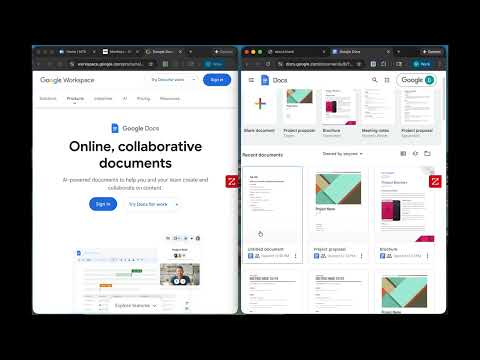
Automatically moves unpinned tabs to a separate junk window
Finally, a clean browser. Tab HQ automatically organizes your Chrome tabs so your main window stays clean and focused. No more tab chaos. How It Works 1. Pin your important tabs - Gmail, Calendar, work tools, whatever you use daily 2. Browse normally - Open new tabs, click links, let websites create pop-ups 3. Everything auto-organizes - All unpinned tabs automatically move to a separate "junk" window 4. Stay focused - Your main window stays clean with only your pinned tabs Perfect For ✓ People who end up with 50+ tabs open ✓ Knowledge workers juggling multiple projects ✓ Anyone who wants a cleaner browsing experience ✓ Researchers who need to separate core tabs from reference material Features - Fully automatic - No hotkeys, no manual sorting, just works - Instant organization - New tabs move to junk window immediately - Simple setup - Pin your core tabs and you're done - Zero complexity - No configuration needed, works out of the box - Privacy first - No data collection, no tracking, works 100% locally How to Use First Time: 1. Install Tab HQ 2. Pin the tabs you want to keep (right-click → "Pin tab") 3. That's it - you're done! Daily Use: - Just browse normally - Watch unpinned tabs flow to the junk window - Close the junk window when it gets full - Extension creates a new one automatically Why Tab HQ? Unlike browser tab management extensions that require constant manual input, Tab HQ works automatically in the background. Set it once, forget about it. No learning curve. No configuration menus. No keyboard shortcuts to remember. Just pin what matters and let Tab HQ handle the rest. Privacy & Security Tab HQ doesn't collect, store, or transmit any data. Ever. Everything happens locally on your device. Your browsing history, URLs, and tab content never leave your computer. Get organized. Stay focused. Try Tab HQ.
5 out of 52 ratings
Details
- Version1.1
- UpdatedJanuary 21, 2026
- Size6.75KiB
- LanguagesEnglish (United States)
- Developer
Email
davistuz01@gmail.com - Non-traderThis developer has not identified itself as a trader. For consumers in the European Union, please note that consumer rights do not apply to contracts between you and this developer.
Privacy

This developer declares that your data is
- Not being sold to third parties, outside of the approved use cases
- Not being used or transferred for purposes that are unrelated to the item's core functionality
- Not being used or transferred to determine creditworthiness or for lending purposes