


Overview
Organize Chrome tabs, tab groups, bookmarks, and duplicate pages from a clean new tab workspace.
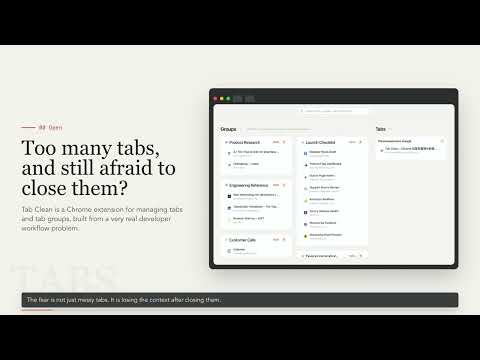
Tab Clean is a Chrome tab manager that helps you organize tabs, tab groups, and bookmarks from a cleaner new tab page and side panel. If you often keep dozens of docs, code repositories, search results, design files, project pages, or research sources open at the same time, Tab Clean helps you understand what is currently open and organize loose tabs into a clearer browser workspace. Core features: Clean tab management view View and manage Chrome tabs, tab groups, and bookmarks in one focused workspace instead of hunting through a crowded top tab bar. Domain-based grouping for ungrouped tabs Tab Clean groups ungrouped tabs by website domain, such as GitHub, Notion, Google Docs, Stack Overflow, and other sites, so related pages naturally stay together. Chrome tab group management Review and organize Chrome tab groups in one place. Useful for project switching, research, development work, debugging, and long-running browsing sessions. Side panel mode Open Tab Clean from the Chrome side panel to check tabs, tab groups, and bookmarks without leaving the page you are currently viewing. Tab and bookmark search Quickly search open tabs, tab groups, and bookmarks to reduce repeated page opening and manual searching. Local-first privacy design Tab Clean is designed to handle your tabs, tab groups, and bookmarks locally by default. Your browser workspace data is used for organizing, searching, grouping, and restoring inside the extension. It is not used for advertising or sold. Coming soon: Pro subscription The Pro plan is planned for individual users who need more powerful organization features, including cloud sync, duplicate tab cleanup, and more complete workspace management. Team subscription The Team plan is planned for team and multi-project collaboration scenarios, with team workspaces, shared spaces, and browser workflows designed for collaboration. Cloud sync A future version is planned to support syncing saved tab groups and workspace data across multiple devices, so you can keep browser context consistent between your work computer and personal computer. Workspaces A future version is planned to support separate workspaces for projects, clients, research topics, or tasks, helping you manage tabs for different contexts separately and reduce context-switching clutter. Who is Tab Clean for? Developers and engineers Manage documentation, issues, pull requests, repositories, API pages, and debugging resources without turning your tab bar into a row of tiny unreadable icons. Researchers and students Organize papers, sources, search results, and reference pages while keeping research context ready for later. Product managers, designers, and operators Switch between projects, clients, competitive research, and workflows without mixing every task into the same browser session. Heavy browser users If you often keep dozens or even hundreds of tabs open, Tab Clean helps turn browser clutter into a workspace that is easier to understand and manage. Use Tab Clean to turn your Chrome new tab page into a tab management center. Organize what is open, keep important context, reduce browser clutter, and stay focused on the work that matters.
5 out of 51 rating
Details
- Version0.0.3
- UpdatedJune 19, 2026
- Size2.43MiB
- Languages4 languages
- DeveloperWebsite
Email
lijunsong2@gmail.com - Non-traderThis developer has not identified itself as a trader. For consumers in the European Union, please note that consumer rights do not apply to contracts between you and this developer.
Privacy

Tab Clean - Tab Manager & Tab Groups has disclosed the following information regarding the collection and usage of your data. More detailed information can be found in the developer's privacy policy.
Tab Clean - Tab Manager & Tab Groups handles the following:
This developer declares that your data is
- Not being sold to third parties, outside of the approved use cases
- Not being used or transferred for purposes that are unrelated to the item's core functionality
- Not being used or transferred to determine creditworthiness or for lending purposes