

Tab Choice - Smart Tab Manager

Overview
Efficient tab manager with sidebar view, search & drag-drop
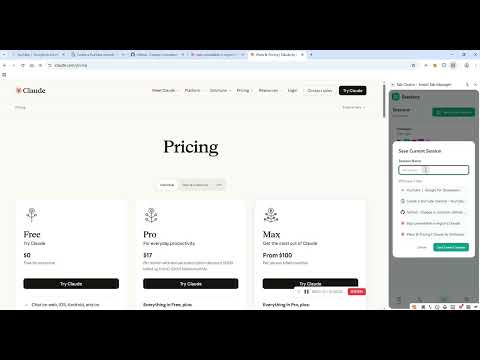
# Tab Choice - Smart Tab Manager > Bring order to your browser chaos --- ## 📋 Overview Tab Choice is an efficient Chrome tab management extension that helps you easily take control of dozens or even hundreds of open tabs. With an intuitive sidebar interface, powerful search functionality, flexible drag-and-drop sorting, and innovative tab hibernation technology, your browsing experience becomes more productive while saving system memory. --- ## ✨ Core Features ### 🎯 Smart Tab Management - **Sidebar View** - View all your open tabs in the browser sidebar - **Multi-Window Support** - Automatically group tabs by window - **Real-Time Sync** - Instant updates when tabs change - **One-Click Switch** - Quickly jump to any tab with a single click ### 🔍 Powerful Search - **Real-Time Search** - Filter tabs instantly as you type - **Multi-Dimensional Matching** - Search by title, URL, or domain - **Smart Sorting** - Results intelligently sorted by relevance - **Fuzzy Matching** - Find what you're looking for with partial keywords ### 🎨 Beautiful Interface - **Modern Design** - Gradient colors and glassmorphism effects - **Dark Mode** - Automatically follows system theme - **Smooth Animations** - Delicate transitions and interactive animations - **Responsive Layout** - Adapts to all screen sizes ### 🔀 Drag & Drop Sorting - **Free Dragging** - Drag tabs to reorder freely - **Cross-Window Movement** - Drag tabs to other windows - **Visual Feedback** - Clear drop indicators - **Visual Feedback** - Clear drop indicators ### ⚡ Convenient Operations - **Quick Close** - Close button appears on hover - **Audio Indicator** - Highlight tabs playing audio - **Current Tab Highlight** - Clearly identify the active tab - **Window Collapse** - Collapse unused window groups ### 💾 Tab Hibernation (Memory Saving) - **Light Hibernate** - Quick sleep, tabs remain visible - **Deep Hibernate** - Release more memory - **Auto Hibernate** - Automatically hibernate inactive tabs - **Never Hibernate** - Set rules to keep important tabs always active ### 🗂️ Workspaces - **Custom Workspaces** - Organize tabs by project or context - **Auto Grouping** - Automatically add new tabs to workspace - **Domain Grouping** - Group tabs by website domain ### 📑 Sessions Management - **Save Sessions** - Save current window as a session - **Quick Restore** - One-click restore saved sessions - **Session Backup** - Never lose your work progress ### 🖥️ Split Screen - **Multi-Panel View** - View multiple websites side by side - **Drag & Resize** - Freely arrange panel positions and sizes - **Add from Tabs** - Select open tabs to add to split screen - **Layout Save** - Save split screen layouts to bookmarks ### 📊 Usage Analytics - **Tab Statistics** - Track your browsing habits - **Zombie Tab Detection** - Identify tabs consuming memory - **Cleanup Suggestions** - Get recommendations to free up resources ### 🔧 Built-in Tools - **Bookmarks Manager** - View and manage your bookmarks - **History Browser** - Quick access to browsing history - **Downloads Manager** - Monitor and manage downloads - **Extensions Manager** - Control browser extensions --- ## 🚀 Use Cases ### 💼 Multi-Tasking When working with multiple documents, code repositories, and reference materials open simultaneously, Tab Choice helps you quickly locate the tab you need. ### 📚 Research & Learning When researching with large amounts of materials, use the search function to quickly find relevant pages. ### 🔄 Project Switching Use different windows for different projects and easily switch between them with grouped management. ### 🧹 Tab Organization Regularly clean up unnecessary tabs to keep your browser tidy. Use tab hibernation to save memory without closing tabs. ### 🖥️ Multi-Screen Comparison Use split screen feature to view multiple websites simultaneously for easy comparison and reference. --- ## 🔒 Privacy & Security - **Local Processing** - All data stored locally, never uploaded to servers - **Minimal Permissions** - Only requests necessary permissions - **Open Source** - Code is public and auditable - **Ad-Free** - Pure experience with no interruptions --- ## 📝 Changelog ### v1.0.0 (2026-03-17) - ✨ Initial release - 🎯 Basic tab management features - 🔍 Title/URL search with smart sorting - 🎨 Modern UI design with dark mode - 🔀 Drag and drop functionality - 💾 Tab hibernation (light & deep) - 🗂️ Workspaces with auto grouping - 📑 Sessions management - 🖥️ Split screen feature - 📊 Usage analytics - 🔧 Built-in tools (bookmarks, history, downloads, extensions) --- ## 💬 Feedback & Support If you have any questions, suggestions, or feature requests, feel free to reach out to us: - 📧 Submit an Issue - 🌟 Star the project - 🤝 Contribute code --- ## 📜 License MIT License - Free to use and modify --- **Enjoy an organized browsing experience!** 🎉
0 out of 5No ratings
Details
- Version1.0.0
- UpdatedMarch 24, 2026
- Offered byzxs953244795
- Size408KiB
- LanguagesEnglish (United States)
- Developer
Email
953244795@qq.com - Non-traderThis developer has not identified itself as a trader. For consumers in the European Union, please note that consumer rights do not apply to contracts between you and this developer.
Privacy

This developer declares that your data is
- Not being sold to third parties, outside of the approved use cases
- Not being used or transferred for purposes that are unrelated to the item's core functionality
- Not being used or transferred to determine creditworthiness or for lending purposes