

Tab Cards

Overview
Advanced tab management with drag and drop, window organization, and multi-select features
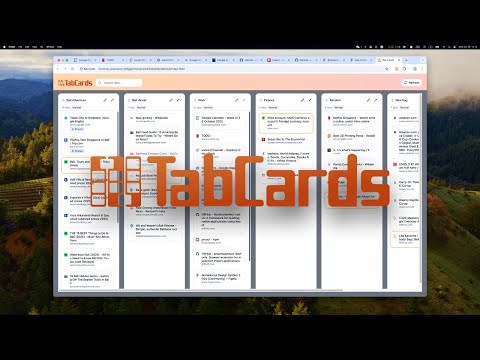
TabCards helps you manage browser tabs more efficiently by showing all your open windows and tabs in a clear, board-style layout. Each browser window is displayed as a column, and each tab appears as a card that you can move around and manage. You can drag tabs to reorder them or move them between windows, rename and reorder windows, and select multiple tabs to organize them together. It’s also possible to create a new window from selected tabs, pin important ones, close unused ones, or hibernate tabs to free up memory. A built-in search makes it easy to find any tab by its title or page URL. TabCards is designed for users who keep many tabs open across multiple windows and want a faster, more visual way to stay organized and navigate their browsing sessions.
0 out of 5No ratings
Details
- Version1.0.1
- UpdatedNovember 4, 2025
- Offered byDaydrop One
- Size129KiB
- LanguagesEnglish
- DeveloperDaydrop One OU
Tartu mnt 67/1-13b Tallinn 10115 EEEmail
support@daydrop-one.comPhone
+372 5633 6606 - TraderThis developer has identified itself as a trader per the definition from the European Union and committed to only offer products or services that comply with EU laws.
- D-U-N-S565740077
Privacy

This developer declares that your data is
- Not being sold to third parties, outside of the approved use cases
- Not being used or transferred for purposes that are unrelated to the item's core functionality
- Not being used or transferred to determine creditworthiness or for lending purposes