


Tổng quan
Automatically refresh tabs based on custom time intervals
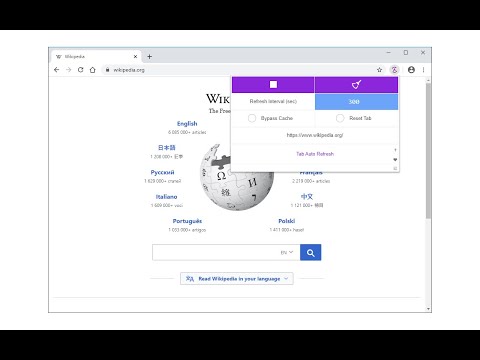
Tab Auto Refresh is a browser addon that helps you automatically reload (refresh) tabs of your choice. To operate with this addon, please open toolbar popup UI while you are visiting a website. Adjust time interval in seconds (i.e. 120 sec) and you are all set. Selected tab will be reloaded based on the interval you just set. Please note reloading occurs based on tab URL not tab ID or domain. If you want to stop the current "reload" task, please press on the "stop" button at top left corner in toolbar popup UI. Alternatively you can set the interval to 0 which is equal to stop function. If you have many tabs reloading and do not want to visit each tab to clear the reloading task, please open toolbar popup UI and press on the "reset" (top right) button to do so. This button serves as a global reset button and clears the reloading task for all tabs. Note: The toolbar popup interface supports dark mode. To switch the popup interface theme to dark, please press the moon icon on the bottom left corner. To report bugs, please visit addon's homepage (https://mybrowseraddon.com/tab-auto-refresh.html) and fill the bug report form.
4,2/574 lượt xếp hạng
Chi tiết
- Phiên bản0.2.3
- Đã cập nhật29 tháng 4, 2026
- Nhà cung cấpMeryDev
- Kích thước48.91KiB
- Ngôn ngữEnglish
- Nhà phát triển
Email
schomery.developer@gmail.com - Người bán phi thương mạiNhà phát triển này không tự nhận mình là người bán. Đối với người tiêu dùng ở Liên minh Châu Âu, xin lưu ý rằng các quyền của người tiêu dùng không được áp dụng trong hợp đồng giữa bạn và nhà phát triển này.
Quyền riêng tư

Nhà phát triển này tuyên bố rằng dữ liệu của bạn
- Không được bán cho bên thứ ba, ngoài những trường hợp sử dụng đã được phê duyệt
- Không được sử dụng hoặc chuyển nhượng cho các mục đích không liên quan đến chức năng chính của mặt hàng
- Không được sử dụng hoặc chuyển nhượng để xác định khả năng thanh toán nợ hoặc phục vụ mục đích cho vay
Hỗ trợ
Nếu bạn có câu hỏi, ý kiến đề xuất hoặc gặp vấn đề, hãy truy cập trang web hỗ trợ của nhà phát triển để được trợ giúp