


Prezentare generală
Automatically refresh tabs based on custom time intervals
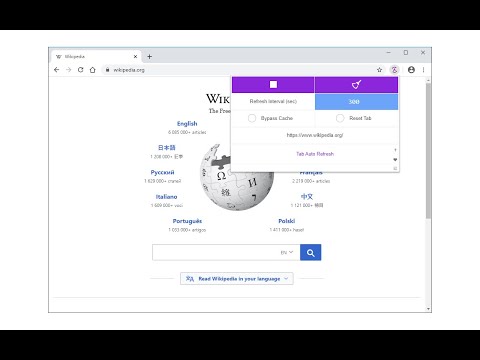
Tab Auto Refresh is a browser addon that helps you automatically reload (refresh) tabs of your choice. To operate with this addon, please open toolbar popup UI while you are visiting a website. Adjust time interval in seconds (i.e. 120 sec) and you are all set. Selected tab will be reloaded based on the interval you just set. Please note reloading occurs based on tab URL not tab ID or domain. If you want to stop the current "reload" task, please press on the "stop" button at top left corner in toolbar popup UI. Alternatively you can set the interval to 0 which is equal to stop function. If you have many tabs reloading and do not want to visit each tab to clear the reloading task, please open toolbar popup UI and press on the "reset" (top right) button to do so. This button serves as a global reset button and clears the reloading task for all tabs. Note: The toolbar popup interface supports dark mode. To switch the popup interface theme to dark, please press the moon icon on the bottom left corner. To report bugs, please visit addon's homepage (https://mybrowseraddon.com/tab-auto-refresh.html) and fill the bug report form.
4,2 din 574 de evaluări
Detalii
- Versiune0.2.2
- Data ultimei actualizări30 iunie 2025
- Oferit deMeryDev
- Dimensiune52.01KiB
- LimbiEnglish
- Dezvoltator
E-mail
schomery.developer@gmail.com - Non-comerciantDezvoltatorul nu s-a identificat drept comerciant. Pentru consumatorii din Uniunea Europeană, reține că este posibil ca drepturile consumatorilor să nu se aplice contractelor încheiate între tine și acest dezvoltator.
Confidențialitate

Acest editor declară că datele:
- nu sunt vândute terților în alte scopuri decât pentru situațiile de folosire aprobate.
- nu sunt folosite sau transferate în scopuri care nu au legătură cu funcțiile principale ale articolului;
- nu sunt folosite sau transferate pentru a stabili solvabilitatea sau în scopuri de împrumut.
Asistență
Pentru ajutor în legătură cu întrebări, sugestii sau probleme, accesează site-ul de asistență al dezvoltatorului