

T-meet: AI Meeting Recorder for Google Meet, Zoom & Teams

Descripción general
Record and transcribe Google Meet, Zoom and Teams meetings with AI: speakers, summary, action items and PDF. Free 1.5 h a month.
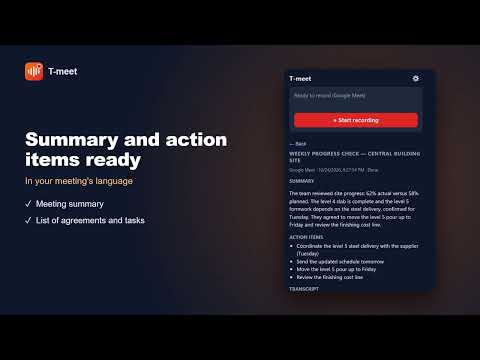
Record, transcribe and summarize your Google Meet, Zoom and Microsoft Teams (web) meetings with AI. T-meet tells the speakers apart, writes the summary and gives you the list of action items, ready to share or export as a PDF. WHY T-MEET - No bots: nobody joins your meeting. T-meet records the audio of your browser tab. - Transcript with speakers (Speaker A, B, C) that you can rename, and a summary in the same language as the meeting. - Summary shaped by meeting type: general, site progress, committee, client or daily stand-up. - Action items ready to go: send them to a TPlanner project with one click. - Your meetings are stored in your browser; the server processes the audio in transit and does not store it. - Your own glossary and style (optional): names and acronyms spelled right, and the tone you prefer. HOW IT WORKS 1. Join your meeting and try it without an account (10 minutes), or create your free account from the extension's Options. 2. Press "Start recording" on the extension icon; when you finish, press "Stop recording". 3. Get the transcript with speakers, the summary and the action items. 4. Review, copy with formatting (to paste into Google Docs, Word or Notion), download as PDF or Markdown, or delete any recorded meeting from the popup. YOUR OWN VOICE - If you allow it in Options, your microphone is recorded too so your own words appear in the transcript. Headphones avoid echo. PLANS - No account: try 10 minutes of transcription in guest mode, no sign-up. - Free plan: 1.5 hours of transcription every month, for as long as you like. No card required. - T-meet subscription: $9.99/month, with up to 15 hours of transcription per month (renews every month). - TPlanner customers: if your account has a Professional (20 hours per month) or Enterprise (100 hours per month) plan, T-meet is included at no extra cost, and if you're already signed in at tplanner.io the extension connects by itself. PRIVACY - Recording only starts when you start it. - Your recordings, transcripts and summaries are stored only in your browser (IndexedDB). The server processes the audio in transit and does not store it. - No analytics, no tracking, no third-party code. LIMITATIONS - Works only with the web versions of Zoom and Teams (not the desktop apps). - Without an account you can only try 10 minutes (guest mode); for more you need a free account. Transcription and summaries are processed on TPlanner's server using OpenAI and Anthropic services. - Speakers are told apart as letters (A, B, C) and you can give them names; in long meetings the letters can change between blocks of about 5 minutes. - Let participants know you are recording: in many countries it is required.
5 de 53 calificaciones
Detalles
- Versión1.11.0
- Fecha de actualización4 de noviembre de 2026
- Tamaño60.89KiB
- Idiomas2 idiomas
- DesarrolladorTPLANNERSitio web
av paseo la castellana 1230 surco, Municipalidad Metropolitana de Lima 15049 PECorreo electrónico
contacto@tplanner.ioTeléfono
+51 914 946 028 - ComercianteEste desarrollador se identificó como comerciante de acuerdo con la definición de la Unión Europea y se comprometió a ofrecer solo productos o servicios que cumplan con las leyes de la UE.
Privacidad

T-meet: AI Meeting Recorder for Google Meet, Zoom & Teams divulgó la siguiente información sobre la recopilación y el uso de tus datos. En la privacy policy del desarrollador, encontrarás más información.
T-meet: AI Meeting Recorder for Google Meet, Zoom & Teams controla lo siguiente:
Este desarrollador declara el siguiente tratamiento de tus datos:
- No se venden a terceros, excepto en los casos de uso aprobados
- No se utilizan ni transfieren para fines no relacionados con la funcionalidad principal del elemento
- No se utilizan ni transfieren para determinar tu solvencia ni ofrecer préstamos
Asistencia
Si tienes preguntas, sugerencias o problemas, visita el sitio de asistencia del desarrollador