


Overview
Copy Deep Research articles from ChatGPT as Rich Text, Markdown, or HTML
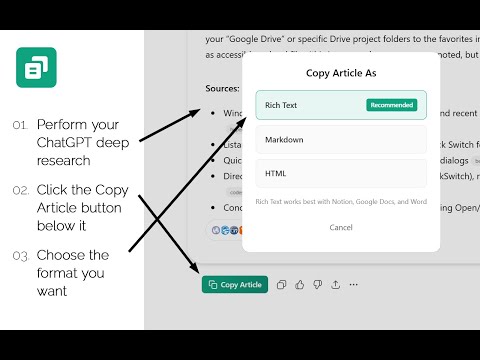
Copy ChatGPT Deep Research articles easily, with links and sources. When ChatGPT generates a Deep Research report, this extension adds a "Copy Article" button that lets you export the entire embedded Deep Research article with all formatting preserved. FEATURES: • One-click copying of Deep Research articles • Three export formats: Rich Text, Markdown, or HTML • Preserves headings, lists, bold, italics, links, and blockquotes • Includes citations and source references • Works seamlessly with Notion, Google Docs, Microsoft Word, and other apps HOW TO USE: 1. Open a ChatGPT conversation containing a Deep Research report 2. Look for the "Copy Article" button in the action row below the article 3. Click it and choose your preferred format: - Rich Text (recommended): Paste directly into Notion, Google Docs, or Word - Markdown: For markdown editors and developer tools - HTML: For web publishing or advanced formatting needs 4. Paste into your destination app ** IMPORTANT: The Deep Research Copier is a Chrome extension, and therefore must be used in the Chrome browser with the web version of ChatGPT. The button will not appear in the desktop version of ChatGPT, simply go to the web app version and copy your Deep Research article there. PRIVACY: This extension only runs on chatgpt.com and chat.openai.com. It does not collect, store, or transmit any data. All processing happens locally in your browser. PERMISSIONS: • clipboardWrite: Required to copy content to your clipboard Created by Sygnal Technology Group
5 out of 52 ratings
Details
- Version0.1.2
- UpdatedFebruary 16, 2026
- Size20.85KiB
- LanguagesEnglish
- DeveloperWebsite
Email
info@sygnal.com - Non-traderThis developer has not identified itself as a trader. For consumers in the European Union, please note that consumer rights do not apply to contracts between you and this developer.
Privacy

This developer declares that your data is
- Not being sold to third parties, outside of the approved use cases
- Not being used or transferred for purposes that are unrelated to the item's core functionality
- Not being used or transferred to determine creditworthiness or for lending purposes
Support
For help with questions, suggestions, or problems, visit the developer's support site