

SwipeNav: Private Mouse Gestures

Overview
Hold right-click and draw to go back, forward, close, reopen or switch tabs. Zero data collection, every gesture free.
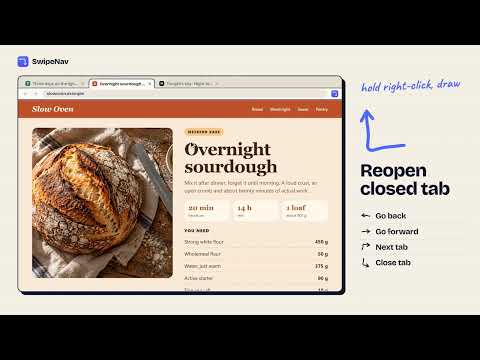
Navigate Chrome with a flick of the mouse. Hold the right button, draw a short line, let go. Left goes back, right goes forward, down then right closes the tab. Your hand never leaves the mouse and you never hunt for a tiny toolbar button again. SwipeNav does one job and keeps your browsing to itself. It makes no network requests, has no analytics, no ads and no account. It asks for two permissions, and there is nothing to unlock: every gesture and every option is free. WHAT YOU CAN DO - Go back and forward, reload, or reload without the cache - Close a tab, reopen the last closed tab, open or duplicate a tab - Jump to the next, previous, first or last tab - Scroll to the top or bottom of the page - Pin or mute a tab - Open, close or minimize a window MAKE IT YOURS - Map any drawing of up to 8 strokes to any of the 19 actions - Record a new gesture by drawing it in the settings pad, or build it with arrow buttons - Choose the trail color and thickness, or hide the trail completely - An on-screen label shows what a gesture will do before you release the button - Adjust how long a stroke must be, for quick flicks or deliberate strokes - Turn gestures off on single sites, such as maps and design tools that use right-button dragging - Export your setup to a file and import it elsewhere DEFAULT GESTURES Left: back. Right: forward. Up: scroll to top. Down: scroll to bottom. Up then down: reload. Down then right: close tab. Left then up: reopen closed tab. Up then left: previous tab. Up then right: next tab. Right then up: new tab. PRIVATE BY DESIGN - No data leaves your browser. The extension contains no code that contacts a server. - It never reads page content, addresses or history. It only watches the right mouse button. - Settings are stored locally on your device. - Small, readable code with no third-party libraries. GOOD TO KNOW - A normal right-click still opens the context menu. On macOS and Linux, right-click twice quickly to open it. - Chrome does not allow extensions to run on its own pages, the new tab page or the Chrome Web Store, so gestures cannot work there. - After installing, reload tabs that were already open.
0 out of 5No ratings
Details
- Version1.0.2
- UpdatedOctober 13, 2026
- Offered byNisreen Maher
- Size52.11KiB
- LanguagesEnglish
- Developer
Email
mohelm97@gmail.com - Non-traderThis developer has not identified itself as a trader. For consumers in the European Union, please note that consumer rights do not apply to contracts between you and this developer.
Privacy

This developer declares that your data is
- Not being sold to third parties, outside of the approved use cases
- Not being used or transferred for purposes that are unrelated to the item's core functionality
- Not being used or transferred to determine creditworthiness or for lending purposes
Support
For help with questions, suggestions, or problems, please open this page on your desktop browser