Item logo image for Svid Clipper

Svid Clipper

Item media 6 (screenshot) for Svid Clipper
Item video thumbnail
Item media 2 (screenshot) for Svid Clipper
Item media 3 (screenshot) for Svid Clipper
Item media 4 (screenshot) for Svid Clipper
Item media 5 (screenshot) for Svid Clipper
Item media 6 (screenshot) for Svid Clipper
Item video thumbnail
Item media 2 (screenshot) for Svid Clipper
Item media 3 (screenshot) for Svid Clipper
Item media 4 (screenshot) for Svid Clipper
Item media 5 (screenshot) for Svid Clipper
Item media 6 (screenshot) for Svid Clipper

Overview

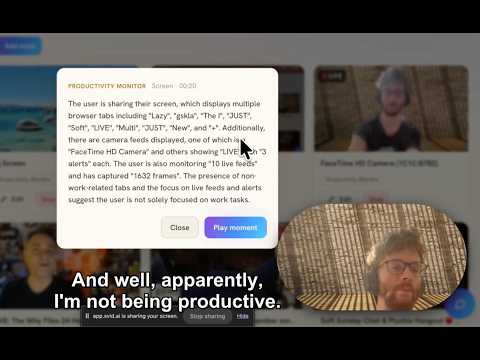
Send the current tab's video or link to Svid, and live-monitor a playing tab, a whole site by screenshot, or your meeting's tab.

Svid Clipper sends footage to your Svid account (svid.ai), the AI video-intelligence platform where you ask your cameras and recordings anything. Use it to capture what Svid can't fetch on its own: - One click (or right-click) sends the current tab's video, or any link, to Svid. - Live-monitor a playing tab - frames stream to your account in real time so your checks run live and alert you the moment something happens. Meetings too: on your call's tab, click the Svid icon and hit Monitor. Once footage reaches Svid you get semantic search across everything you've captured, alerts when your conditions are met, and plain-language reports - all from checks you pick in your own words. Capture scopes: - Just the video playing on the page - The whole browser tab (meetings included) Privacy: the extension talks only to the Svid API using your own sign-in (Google/OAuth, or an API key you paste in Options). It installs with NO access to the sites you visit - Chrome asks per site, the first time you record one. Page content is never sent anywhere except your own Svid account. Requires a Svid account (free to create at svid.ai). After connecting, click the toolbar icon to start monitoring, or right-click any video or link to send it.

Details

  • Version
    1.6.5
  • Updated
    August 20, 2026
  • Size
    57.44KiB
  • Languages
    English
  • Developer
    SVID AI LTD
    71-75 Shelton Street LONDON WC2H 9JQ GB
    Website
    Email
    robert@svid.ai
    Phone
    +44 7479 747888
  • Trader
    This developer has identified itself as a trader per the definition from the European Union and committed to only offer products or services that comply with EU laws.
  • D-U-N-S
    233768080

Privacy

Manage extensions and learn how they're being used in your organization

Svid Clipper has disclosed the following information regarding the collection and usage of your data. More detailed information can be found in the developer's privacy policy.

Svid Clipper handles the following:

Authentication information
Website content

This developer declares that your data is

  • Not being sold to third parties, outside of the approved use cases
  • Not being used or transferred for purposes that are unrelated to the item's core functionality
  • Not being used or transferred to determine creditworthiness or for lending purposes

Support

Related

Quick Open

5.0

Hover a link, tap a key, and it opens in a background tab — or queue videos up and open them all at once.

Скриншотер и запись экрана - Видео в ссылку

0.0

Скриншотер и запись экрана: снимок области или всей страницы, видео со звуком и камерой, редактор и ссылка на результат.

Clipy: Agent-Native Screen Recorder for AI Agents

5.0

The agent-native screen recorder. Record any tab, window, or webcam; every clip gets an AI summary, transcript, and key moments.

Screen Recorder

3.8

Record a video from the camera or capture it from the screen (desktop, specific application window or browser tab)

Simple Video Capture

0.0

Record your browser tab as a video file.

Copy YouTube Transcript

5.0

Copy transcripts from YouTube videos, Shorts and completed live-stream replays when captions are available.

Simple Web Recorder

0.0

Record a browser tab silently, add narration and camera layers, and save locally.

ShotFlow - Full Page Screenshot, Recorder & Mockups

5.0

Full page screenshots and screen recording, then drop the capture straight into a device mockup. No account, no watermark.

ClipCast – Screen Recorder with Webcam & Share Links

5.0

Record your screen, tab or webcam with audio, then share a link the moment you stop. No account needed to watch it.

Screen Dub – Screen Recorder & AI Tutorial Maker

0.0

Record a window, a tab, or your screen. ScreenDub writes the script and narrates it for you.

Clipto.AI: AI Notetaker for Meetings & Web Audio

1.0

Record meetings, videos, and audio directly in your browser - with AI transcription and summaries.

Screenshot & Screen Recorder - Shot by Laze

5.0

Screenshot tool & screen recorder for Chrome. Full page, scrolling, visible area or desktop capture. Annotate & share with your team

Quick Open

5.0

Hover a link, tap a key, and it opens in a background tab — or queue videos up and open them all at once.

Скриншотер и запись экрана - Видео в ссылку

0.0

Скриншотер и запись экрана: снимок области или всей страницы, видео со звуком и камерой, редактор и ссылка на результат.

Clipy: Agent-Native Screen Recorder for AI Agents

5.0

The agent-native screen recorder. Record any tab, window, or webcam; every clip gets an AI summary, transcript, and key moments.

Screen Recorder

3.8

Record a video from the camera or capture it from the screen (desktop, specific application window or browser tab)

Simple Video Capture

0.0

Record your browser tab as a video file.

Copy YouTube Transcript

5.0

Copy transcripts from YouTube videos, Shorts and completed live-stream replays when captions are available.

Simple Web Recorder

0.0

Record a browser tab silently, add narration and camera layers, and save locally.

ShotFlow - Full Page Screenshot, Recorder & Mockups

5.0

Full page screenshots and screen recording, then drop the capture straight into a device mockup. No account, no watermark.

Google apps
