

Svid Clipper

Overview
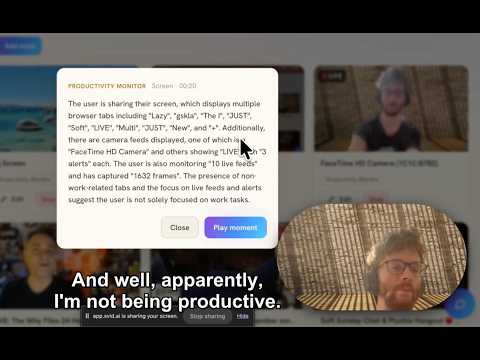
Send the current tab's video or link to Svid, and live-monitor a playing tab, a whole site by screenshot, or your meeting's tab.
Svid Clipper sends footage to your Svid account (svid.ai), the AI video-intelligence platform where you ask your cameras and recordings anything. Use it to capture what Svid can't fetch on its own: - One click (or right-click) sends the current tab's video, or any link, to Svid. - Live-monitor a playing tab — frames stream to your account in real time, so your checks run live and alert you the moment something happens. Meetings too: on your call's tab, click the Svid icon and hit Monitor. Once footage reaches Svid you get semantic search across everything you've captured, alerts when your conditions are met, and plain-language reports — all from checks you pick in your own words. CAPTURE SCOPES - Just the video: grabs the video playing on the page, even where Svid can't fetch it directly. - The whole tab: records everything happening in the active browser tab — meetings included. HOW IT WORKS 1. Connect your Svid account in Options (Google sign-in, or paste an API key). 2. Click the toolbar icon on any tab with video and hit Monitor — recording starts immediately and streams to your account while it runs. 3. Or right-click any video or link and choose "Send to Svid" to ingest it. 4. Open app.svid.ai to watch the live feed, search your footage in plain English, and add checks that alert you or write reports. WHAT PEOPLE USE IT FOR - Recording and monitoring meetings, webinars, and live streams - Sending videos to Svid from sites Svid's servers can't reach - Running their own checks ("someone enters the frame", "the score changes", "my name is mentioned on a slide") against anything playing in a tab PRIVACY The extension talks only to the Svid API using your own sign-in (Google/OAuth, or an API key you paste in Options). It installs with NO access to the sites you visit — Chrome asks per site, the first time you record one. Nothing records without your explicit click, and page content is never sent anywhere except your own Svid account. No analytics, no third parties, no remote code. REQUIREMENTS A Svid account — free to create at svid.ai. After connecting, click the toolbar icon to start monitoring, or right-click any video or link to send it. Questions or feedback: https://svid.ai/support
0 out of 5No ratings
Details
- Version1.6.4
- UpdatedAugust 6, 2026
- Offered bySvid AI
- Size57.35KiB
- LanguagesEnglish
- DeveloperSVID AI LTD
71-75 Shelton Street LONDON WC2H 9JQ GBEmail
rlmsinclair@gmail.comPhone
+44 7424 391466 - TraderThis developer has identified itself as a trader per the definition from the European Union and committed to only offer products or services that comply with EU laws.
- D-U-N-S233768080
Privacy

Svid Clipper has disclosed the following information regarding the collection and usage of your data. More detailed information can be found in the developer's privacy policy.
Svid Clipper handles the following:
This developer declares that your data is
- Not being sold to third parties, outside of the approved use cases
- Not being used or transferred for purposes that are unrelated to the item's core functionality
- Not being used or transferred to determine creditworthiness or for lending purposes
Support
For help with questions, suggestions, or problems, please open this page on your desktop browser