

Superwritr

Overview
AI writing assistant that uses the page you're on as context. Write posts and replies without switching tabs.
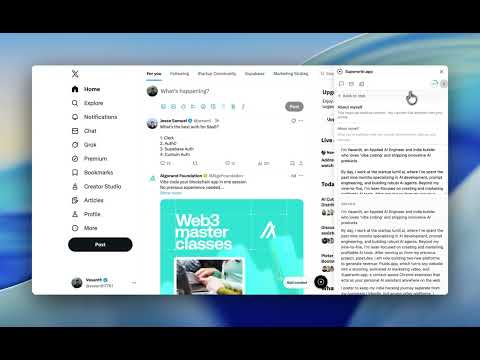
Stop switching tabs to write. You're reading a post, a thread, or an article. You want to reply or add a comment—but opening another tab, pasting the text, and then copying the result back kills your flow. Superwritr fixes that. It works where you already are. Superwritr is a writing assistant that lives in your browser. It sees the same page you see: the post, the reply box, the comment field. Hover over the text you care about, click once, and get a draft written for that exact context. No copying, no new tabs. You stay on the page, tweak the draft in the side panel if you like, then paste and send. Built for how you actually work. • Reply boxes and comment fields — Click the Superwritr button near a reply or comment box. It uses the surrounding content to draft a response so you can edit and post in seconds. • Posts and long-form — Highlight or select the block you're replying to. Get a draft that matches the tone and topic. • One place for everything — The side panel keeps your conversation, history, and drafts in one place. No hunting through tabs. • Your context, not a blank page — Superwritr uses the page you're on. The draft is grounded in what you're reading, so it's relevant and ready to refine. Who it's for. If you spend time writing replies on LinkedIn, Twitter/X, Reddit, or in comment sections and forums—and you're tired of tab-switching and copy-pasting—Superwritr is for you. Same for support teams, community managers, and anyone who writes a lot of short-form content across the web. You get a monthly credit allowance to run drafts; you can top up or upgrade if you need more. Try it. Install the extension, sign in with your email, and open any page with a reply box or text you want to respond to. Hover, click, and get your first draft. No tab switching, no jargon—just faster writing where you already work.
0 out of 5No ratings
Details
- Version1.0.0
- UpdatedMarch 21, 2026
- FeaturesOffers in-app purchases
- Offered byvasanth7781
- Size113KiB
- LanguagesEnglish
- Developer
Email
vasanth7781@gmail.com - Non-traderThis developer has not identified itself as a trader. For consumers in the European Union, please note that consumer rights do not apply to contracts between you and this developer.
Privacy

Superwritr has disclosed the following information regarding the collection and usage of your data. More detailed information can be found in the developer's privacy policy.
Superwritr handles the following:
This developer declares that your data is
- Not being sold to third parties, outside of the approved use cases
- Not being used or transferred for purposes that are unrelated to the item's core functionality
- Not being used or transferred to determine creditworthiness or for lending purposes
Support
For help with questions, suggestions, or problems, visit the developer's support site