


Overview
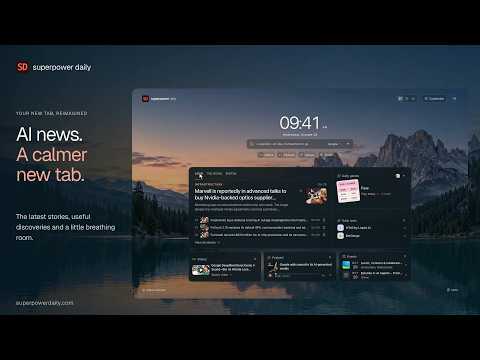
AI news, daily games and a little more focus. Make every new tab yours with beautiful backgrounds and customizable widgets.
Your AI news. Your daily priorities. Your kind of new tab. Superpower Daily is a customizable Chrome new tab extension for AI news, daily briefings, useful discoveries and a little more focus. Build a personal start page with the components you want, beautiful backgrounds and quick access to what matters today. -------------------- 📰 AI NEWS & DAILY BRIEFINGS - Browse the latest AI news, top stories from this week or month, and the daily briefing. - See breaking news and live event coverage when there is an active published update. - Open stories directly, save articles for later, and choose no news images, a lead image only or thumbnails throughout. 🃏 SWIPE THROUGH THE NEWS - Read one story card at a time, with available summaries and story text in a scrollable reader. - Continue through the published news archive and older briefings, beyond the four-story dashboard preview. - Drag a card, use the action buttons or navigate with keyboard shortcuts. Save a story without leaving the reader. - Previously swiped stories stay hidden across feeds. Undo a swipe or use Review again when you want to revisit stories. - Open the keyboard-help popup for scrolling, page navigation, saving, undo and more. 🧩 DAILY GAMES & AI TOOLS - Take a break with word games, logic puzzles and other daily challenges, with previews inspired by the actual game boards. - Pin a favorite game, choose a random game each day or roll the animated 3D dice for another suggestion. - Jump straight to today's dated puzzle, or discover a useful AI tool and open its detail page. 🎧 VIDEOS, PODCASTS & EVENTS - Discover videos, podcast episodes and upcoming events, with thumbnails when available. - Open a video on its Superpower Daily page. No embedded video starts automatically in your new tab. - Start a podcast when you want to listen. Play, pause, seek and change speed from compact controls. - Podcast playback is shared across new tabs and can continue after a new-tab page closes. - Browse events using the available city and online filters, and open each event's own page. 🎯 YOUR TASKS, DAILY PRIORITY & FOCUS TIMER - Keep a simple to-do list: add, edit, reorder, complete or remove tasks, with Undo for recent changes. - Star one task as today's priority, and unstar it without deleting the task. - Add an article or tool to your tasks so you can return to it later. - Start a 15-, 25- or 50-minute focus session, with pause, resume and end controls. - Your session deadline survives tab closure and browser restart. Local tasks remain available offline. 🎨 BEAUTIFUL BACKGROUNDS - Choose nature scenes, AI and tech artwork, solid colors, gradients, patterns or your own photo. - Keep a favorite scene or choose a daily background collection. - Adjust background dimming and blur, pick a light, dark or system theme, and choose your accent color. - Hover over or press and hold the background name to temporarily hide the interface and enjoy the full scene. 🛠 A LAYOUT THAT FITS YOU - Expanded: see your news panel and supporting components together, with additional components below. - Compact: view one component at a time using tabs. - Swipe: keep a news card in the middle, with supporting components alongside it on larger screens. - Small windows automatically use Compact while remembering your desktop preference. - Enable, disable and reorder supporting components. Show or hide the news, clock, search, links, alerts and tasks. - Changes save automatically. Reset to defaults, or export and import your layout settings. 🔎 SEARCH, SHORTCUTS & CLOCK - Search with Google by default, choose DuckDuckGo or search Superpower Daily. - Superpower search shows results beneath the search box, with filters for stories, companies, topics and tools. - Add, edit, remove and reorder website shortcuts, including your own favorite destinations. - Choose whether links open in a new tab. Show a clock and date that follow your browser's local time zone. 🌍 YOUR LANGUAGE & READING PREFERENCES - The interface supports 20 languages, detected automatically or selected manually. - Right-to-left interface support is included for Arabic, Persian and Hebrew. - Choose Standard, Large or Extra large text, independently from comfortable or compact spacing. - Published news, media and puzzle content stay in their original language; interface translation does not translate articles or puzzle answers. 🔐 OPTIONAL ACCOUNT, LOCAL CONTROL - Use the main new-tab features without creating an account. - Connect your Superpower Daily account through the website to access saved articles, followed interests, reading progress and optional personalized picks. - Connected accounts share swipe history with the website and other connected browsers. Task synchronization has its own opt-in. - Layout settings, custom links, background photos and focus-session timers stay on your device. Settings exports exclude account credentials and photo data. ⚡ DESIGNED FOR EVERY NEW TAB - Enabled, visible components load content when needed, with smaller thumbnails and caching to reduce repeat downloads. - Backgrounds and the page shell are packaged locally, so the interface can appear before fresh content arrives. - Cached content supports limited offline use. Fresh news, search, streaming media and external pages require an internet connection. -------------------- Make room for the news you care about and the day you want to have. Superpower Daily replaces your browser's new tab page. Choose your components, choose your background and make it yours.
0 out of 5No ratings
Details
- Version0.2.0
- UpdatedOctober 30, 2026
- Size2.49MiB
- Languages20 languages
- DeveloperSaeed EzzatiWebsite
743 Grand Ave South San Francisco, CA 94080-2554 USEmail
saeed@spchatgpt.comPhone
+1 415-465-2729 - TraderThis developer has identified itself as a trader per the definition from the European Union and committed to only offer products or services that comply with EU laws.
Privacy

This developer declares that your data is
- Not being sold to third parties, outside of the approved use cases
- Not being used or transferred for purposes that are unrelated to the item's core functionality
- Not being used or transferred to determine creditworthiness or for lending purposes
Support
For help with questions, suggestions, or problems, visit the developer's support site