


Übersicht
Save web content to your SuperCurate library with one click. Clip articles, text snippets, images and PDFs from any webpage.
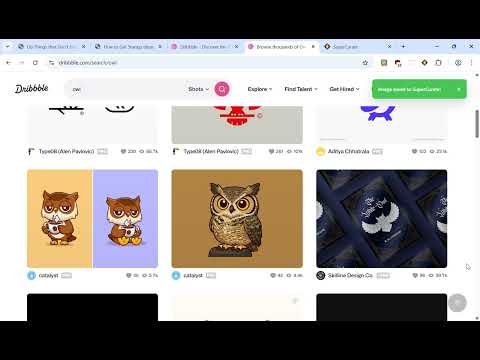
SuperCurate Web Clipper - Your Personal Knowledge Management Tool Never lose important web content again. SuperCurate Web Clipper lets you save articles, text snippets, bookmarks, images, and PDFs from any webpage directly to your SuperCurate library with just one click. This extension serves as a powerful alternative to web clippers like Evernote, OneNote, Notion, Obsidian and others. Key Features: 📄 Save Full Articles Capture entire web pages with intelligent content extraction. SuperCurate automatically pulls out the main content, strips away ads and clutter, and saves a clean, readable version to your library. ✂️ Clip Text Selections Highlight any text on a webpage and save it instantly. Perfect for research, quotes, or saving key information without the surrounding content. 🖼️ Save Images Preserve images from any webpage directly to your library. Great for visual research, inspiration boards, or archiving important graphics. 📑 Save PDFs Clip PDF documents from the web with embedded content support. Keep all your research materials in one organized place. Organization Made Easy: 📁 Collections Organize your saved content into collections for different projects, topics, or interests. Create unlimited collections and move items between them effortlessly. 🏷️ Tags Add multiple tags to each saved item for powerful filtering and search. Build your own taxonomy that makes sense for your workflow. 🔍 Smart Search All your saved content is instantly searchable in your SuperCurate library. Find what you need when you need it. Multiple Ways to Save: ⌨️ Keyboard Shortcuts Save current page: Ctrl+Shift+S (Windows/Linux) or Cmd+Shift+S (Mac) Save selection as HTML: Ctrl+Shift+2 or Cmd+Shift+2 Save page as HTML: Ctrl+Shift+3 or Cmd+Shift+3 🖱️ Context Menus Right-click anywhere on a webpage to access save options for pages, selections, or bookmarks. 🔘 Extension Popup Click the SuperCurate icon in your toolbar for quick access to all save options with collection and tag selection. Why Choose SuperCurate Web Clipper? ✨ Clean Interface - Simple, intuitive design that stays out of your way 🔒 Privacy-Focused - Only accesses content when you actively save it ⚡ Fast & Reliable - Optimized for speed with intelligent content extraction 🎨 Format Preservation - Saves content in both plain text and HTML formats 📱 Cross-Device Sync - Access your saved content from anywhere via SuperCurate Perfect For: 📚 Researchers gathering sources and references 📝 Writers collecting inspiration and quotes 🎓 Students organizing study materials 💼 Professionals curating industry knowledge 🎨 Creatives building inspiration libraries 📖 Avid readers saving articles for later How It Works: 1. Install the extension and sign in to your SuperCurate account 2. Browse the web as usual 3. When you find content worth saving, click the extension icon or use keyboard shortcuts 4. Choose your format (full page, selection or bookmark) 5. Optionally add tags and select a collection 6. Click save and done! 7. All your content is instantly synced to your SuperCurate account and accessible from any device. Privacy & Security: SuperCurate Web Clipper respects your privacy. The extension only accesses webpage content when you actively choose to save something. No browsing history is collected, and all data is securely transmitted directly to your SuperCurate account using encrypted connections. Get Started Today: Install SuperCurate Web Clipper and start building your personal knowledge library. Whether you're researching, learning, or just want to save interesting content for later, SuperCurate makes it effortless. https://getsupercurate.com
0 von 5Keine Bewertungen
Details
- Version1.0.10
- Aktualisiert8. November 2025
- Größe1.48MiB
- SprachenEnglish
- Entwickler
- Kein HändlerDieser Entwickler hat sich nicht als Händler deklariert. Für Verbraucher in der Europäischen Union gelten die Verbraucherrechte nicht für Verträge, die zwischen dir und diesem Entwickler geschlossen werden.
Datenschutz

SuperCurate Web Clipper hat folgende Informationen hinsichtlich der Erhebung und Nutzung deiner Daten offengelegt. Weitere Details findest du im privacy policy des Entwicklers.
SuperCurate Web Clipper verarbeitet Folgendes:
Dieser Entwickler erklärt, dass deine Daten
- nicht an Dritte verkauft werden, außer in den genehmigten Anwendungsfällen
- nicht für Zwecke genutzt oder übertragen werden, die nichts mit der Hauptfunktionalität des Artikels zu tun haben
- nicht zur Ermittlung der Kreditwürdigkeit oder für Darlehenszwecke verwendet oder übertragen werden
Support
Wenn du Hilfe bei Fragen, Vorschlägen oder Problemen benötigst, öffne diese Seite in deinem Desktop-Browser