

Supercharge YouTube, JioHotstar & SonyLIV
2 ratings
)
Overview
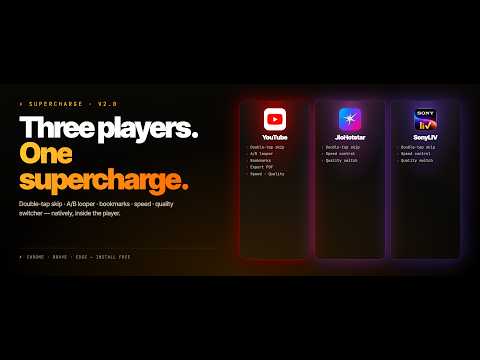
Supercharge your viewing across YouTube, JioHotstar and SonyLIV: Double-tap to skip, Playback speed, Looping, Bookmarks.
Supercharge your viewing across YouTube, JioHotstar and SonyLIV — directly inside the native player. One extension. Three streaming sites. Zero clutter. Tired of digging through nested menus to change quality, fighting with the seek bar to jump 10 seconds, or watching the "Skip Ad" button mock you for 4 seconds before letting you click it? Supercharge fixes all of that without bolting an ugly sidebar onto your browser. Every control lives natively inside the player so it feels like the streaming site shipped it itself. WHAT YOU GET ON ALL THREE SITES (YouTube, JioHotstar, SonyLIV): - Smart Double-Tap to Skip: Double-click the left or right side of the player to jump back/forward 10 seconds — exactly like the mobile app. Tap rapidly to skip further (20s, 30s, 40s…). Double-click the centre to toggle fullscreen. - Playback Speed Control: A clean speed pill in the player bar. Slide, click a preset (1×, 1.25×, 1.5×, 2×, 3×), or fine-tune with the +/− buttons. Speed syncs across iframes so it actually sticks. - Per-Site Toggles: Open the extension popup on any supported site and turn individual features on or off. Settings save instantly, no reload needed. YOUTUBE EXTRAS: - Auto Ad-Skipper: The "Skip Ad" button gets clicked the millisecond it appears. Zero interruption. - A/B Timeline Looper: Drag handles on the progress bar to isolate any segment of the video and loop it perfectly. Built into YouTube's own settings bar. - Frame-Accurate Bookmarks: Press 'B' to drop a pin on the timeline. Jump back to your favourite moments. Long-press a pin to remove it. - One-Click PDF Export: Studying a lecture? Generate a print-ready PDF of all your bookmarks paired with their subtitle text. Landscape or portrait, your call. - Quick Quality Switcher: Change resolution from a dedicated button on the player bar — no more diving into the gear menu. - Instant Playback Speed Shortcut: Toggles between Normal, 1.5×, 2× with a single click; always shows your current speed. DESIGNED TO STAY OUT OF THE WAY: Disable any feature you don't want from the popup. The skip-feedback overlay won't trigger on existing buttons or menus. Double-clicking the player no longer text-selects the title bar. We sweat the details. PRIVACY: We don't track you. Settings are stored locally with chrome.storage. Optional feedback (when you choose to send it) goes to a Google Sheet we read manually. Tip: On YouTube, hit 'B' while watching to drop a bookmark instantly without touching your mouse. Enjoy :) #2.0.2 - YouTube: Fixed Auto Ad-Skipper not skipping ads — now uses multiple click strategies and aria-label selectors to reliably trigger the skip button. - YouTube: Added unskippable ad handling — automatically fast-forwards unskippable ads to completion. - YouTube: Double-tap to skip no longer interferes with the Skip Ad button or ad overlay during ad playback. #2.0.1 - JioHotstar: Fixed a bug where double-tapping near ads could leave the player in a desynced fullscreen state, freezing mouse input until fullscreen was exited manually. #2.0.0 - Major: Unified extension now supports YouTube, JioHotstar and SonyLIV in one install. - Per-site popup with individual toggles for every feature on every platform. - JioHotstar / SonyLIV: Playback speed slider, double-tap to skip, double-click fullscreen, with overlay icons that match each site's native artwork. - SonyLIV: Fixed exit-fullscreen on double-tap; speed control now anchors next to Video Quality / Subtitle & Audio. - Hotstar / SonyLIV: Skip and fullscreen no longer trigger when tapping over native buttons or menus. - All sites: Double-clicking the player no longer accidentally text-selects overlay titles. - New: In-popup Send Feedback link and post-uninstall feedback page. #1.2.0 - Added Instant Playback Speed shortcut button for one-click speed changes. - Redesigned toolbar buttons for perfect vertical alignment and native circular aesthetics. - Optimized Looper: Now starts inactive by default and resets precisely on every new video. - Improved visibility: Added subtle gray shadows to skip feedback for better readability on white/bright screens. - Refined code: Removed heatmap auto-detection for a faster and more predictable looper experience. #1.1.0 - Added extension popup menu with feature toggles (Double-Tap, Bookmarks, Looper). - Integrated Quick Quality Switcher for one-click resolution changes. - Improved Double-Tap engine to prevent accidental video pausing. - Optimized PDF export layouts.
5 out of 52 ratings
Details
- Version2.0.2
- UpdatedJune 30, 2026
- Offered byaakash.agarwal.002
- Size338KiB
- LanguagesEnglish
- DeveloperAakash Kumar Agarwal
Satinath Bhaduri Lane, Bhatta Durga Bari Purnea, Bihar 854301 INEmail
aakash.agarwal.002@gmail.comPhone
+91 75438 74179 - TraderThis developer has identified itself as a trader per the definition from the European Union and committed to only offer products or services that comply with EU laws.
Privacy

This developer declares that your data is
- Not being sold to third parties, outside of the approved use cases
- Not being used or transferred for purposes that are unrelated to the item's core functionality
- Not being used or transferred to determine creditworthiness or for lending purposes
Support
For help with questions, suggestions, or problems, visit the developer's support site