


Visão geral
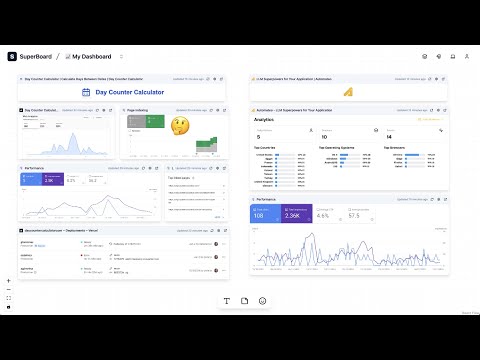
Capture and organize parts of webpages on a customizable board
SuperBoard: Keep Your Important Info in One Place Do you ever feel overwhelmed by too many browser tabs? We did too. That’s why we built SuperBoard—to help you gather the most important parts of any website on a single, easy-to-see board. Why SuperBoard? - Cut Down on Tab Chaos No more jumping between sites for stats, updates, or news. - Always Up to Date Capture the part of a page you need, and SuperBoard will auto-refresh it. - Simple and Clear Our interface is designed to feel natural. Just drag and drop what you want, where you want it. - Free to Start You can try it without paying a dime. If you need more boards or auto-refresh options, we have simple paid plans. How It Works 1. Install the SuperBoard Extension Once installed, you’ll sign up on our website to create your free account. This way, your data is secure and synced. 2. Snip What You Need Highlight just the sections of a site that matter to you—like a chart, text, or image—and hit “Capture.” 3. Organize on Boards Make as many boards as you need. Arrange and label your snippets however you like. 4. Sit Back and Refresh SuperBoard updates your snippets automatically, so you don’t have to check each site every day. Key Features - Capture & Screenshot Select just the parts of a site you want—charts, tables, text, images—and instantly add them to your board. - Unlimited Boards (paid plans) Separate your dashboard by project, team, or personal use. Keep life organized your way. - Auto-Refresh Always have the latest info at your fingertips. Choose how often each snippet updates—no manual refresh needed. - Historical Tracking (paid plans) Compare previous snapshots to see what changed over time, whether it’s competitor pricing or a site redesign. - Advanced Search Can’t remember which board you put that snippet on? A quick search shows you exactly where it is. - Sticky Notes & Emojis Add context with notes or emojis on any snippet—perfect for quick insights or reminders. Powerful Use Cases - Marketing & Competitor Research Track competitor pricing or campaign performance from Google Analytics, social media, or sales platforms—all on one live dashboard. - DevOps & Monitoring Keep an eye on server status, build pipelines, or error logs without logging into multiple portals. - Personal Portfolios Gather live snapshots of your projects, client testimonials, or social proof—showcasing your work at a glance. - Project Dashboards Combine Trello, GitHub, or Asana boards into one space, so you can see key tasks and deadlines in real time. - Virtual Deal Room Consolidate documents, metrics, and competitor intel for streamlined negotiations—update automatically whenever a site changes. Ready to Simplify Your Day? Stop switching tabs and start seeing all your crucial data in one place. Install SuperBoard now for free, and experience the faster, smarter way to stay on top of everything you care about. Try SuperBoard today and see how much time you can save by having everything you need in one place. We’re here to help if you have any questions along the way!
0 de 5Nenhuma nota
Detalhes
- Versão1.0.1
- Atualização24 de janeiro de 2025
- Tamanho373KiB
- IdiomasEnglish
- DesenvolvedorWebsite
E-mail
hello@tabcrab.app - Não negocianteEsse desenvolvedor não se identificou como comerciante. Caso você seja da União Europeia, observe que os direitos do consumidor não se aplicam a contratos firmados entre você e esse desenvolvedor.
Privacidade

SuperBoard divulgou as informações a seguir sobre a coleta e o uso dos seus dados. Para mais detalhes, consulte estas informações do desenvolvedor: privacy policy.
SuperBoard processa o seguinte:
O desenvolvedor declara que seus dados
- Não são vendidos a terceiros, exceto nos casos de uso aprovados
- Não são usados ou transferidos para fins não relacionados à função principal do item
- Não são usados ou transferidos para informações de crédito ou empréstimo