


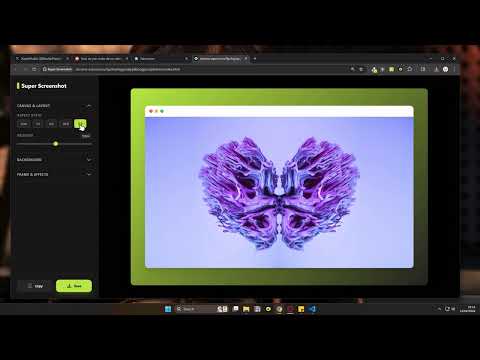
Overview
Create beautiful screenshots quickly.
screenshot can be boring, and screenshot without border limit it's clarity. Super Screenshot is a free browser extension that transforms your regular screenshots into polished, professional-looking images in seconds. Features: > Capture the full visible page or select a specific area > Add beautiful gradient backgrounds, solid colors, or custom images > Adjust padding, border radius, and shadows > Add a macOS-style window frame > Copy to clipboard or save as PNG — no watermark, ever > Drag and drop or paste any image to edit it Note: After saving or copying a screenshot, a brief suggestion may appear for Super Recorder, our companion screen recording tool. You can dismiss it at any time. FAQ: > Is Super Screenshot free? Yes, completely free. > Can I use a custom background? Yes, gradients, solid colors, and image uploads are all supported. > Does it support macOS? Yes, it works on any OS that supports Chrome or Chromium-based browsers. > Will there be a watermark? No watermark. Your screenshots are yours. Got questions? Reach out on X: @hida_artemis
5 out of 51 rating
Details
- Version1.0.0
- UpdatedFebruary 19, 2026
- Size48.24MiB
- LanguagesEnglish
- DeveloperWebsite
Email
support@super-recorder.com - Non-traderThis developer has not identified itself as a trader. For consumers in the European Union, please note that consumer rights do not apply to contracts between you and this developer.
Privacy

This developer declares that your data is
- Not being sold to third parties, outside of the approved use cases
- Not being used or transferred for purposes that are unrelated to the item's core functionality
- Not being used or transferred to determine creditworthiness or for lending purposes
Support
For help with questions, suggestions, or problems, visit the developer's support site