

Pro Extension for Google Calendar™: Bulk Edit, Move Events & Desktop App

Overview
Bulk Edit, Duplicate & Delete · Google Calendar Desktop App Download · Dark Mode. Move multiple events, tasks & appointments at once
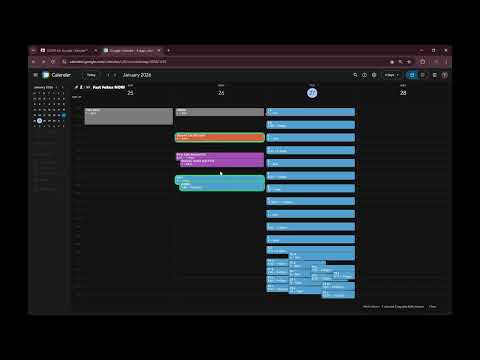
🔐 Google Calendar plugin needs a one-time Google sign-in for Multi-Move and Bulk Delete 🔥 SUPER Tools for Google Calendar™ Move multiple events & tasks at once. Bulk drag-and-drop, Beautiful dark mode, Multi-line titles & Desktop App Download for Google Calendar. Multi-Move for Google Calendar: select several events, drag one, and they all move together. Bulk move, quick duplicate, bulk edit and bulk delete with undo, plus custom colors, dark mode and a desktop app window. 🖥️ Looking for a Google Calendar download for your desktop? SUPER opens Google Calendar Desktop in its own app window. Optional auto-start with your computer, no separate download needed. 🔒 YOUR CALENDAR. YOUR PRIVACY. ✅ Verified by Google. Passed Google’s official OAuth security review ✅ Minimal access. Only your calendar events and email address for sign-in ✅ Sign-in is optional. All visual features work without an account ✅ Your calendar data is never stored on our servers, sold, or used for ads ✅ Revoke access anytime: myaccount.google.com/permissions 🖥️ Google Calendar Desktop App Window Your calendar in its own window, no browser tabs around it. Optional: auto-start when you log in to your computer. ✅ Multi Move (Move many events at once) Multiselect events and move them as a group in Google Calendar (Move multiple Tasks) with Shift + mouse. 1. Shift + Drag to draw a lasso and select multiple events 2. Drag one event with mouse to move all selected events together ✅ Multi-Duplicate: Copy many events at once (NEW) Need the same set of events again next week? Select them, hold Ctrl (⌘ on Mac) and drag one. Google Calendar copies the one you drag, SUPER duplicates the rest with the same time offset. Copies are plain events without guests and Meet links. Undo within 12 seconds removes all copies again. Tasks can't be copied yet. ✅ Quick Duplicate: Copy one event with a single click (NEW) Click an event and press the new copy button next to Edit. SUPER creates the copy at the same time, right next to the original, ready to drag to its new slot. No editor, no page jump. Shortcut: Alt + click (Option + click on Mac) on any event duplicates it right away. Undo within 12 seconds removes the copy again. ✅ Bulk Edit: recolor or move many events at once (NEW) Select several events and click "Edit…" in the badge. Pick one of Google's event colors and all of them change at once, or choose another calendar and they all move there. Undo within 12 seconds puts everything back. ✅ Bulk Edit: Bulk Delete with Undo (NEW) Clean up your calendar in seconds instead of one event at a time. 1. Select several events (lasso or Shift + Click) 2. Press Delete, or click "Delete…" in the badge 3. Check the summary card and confirm Deleted the wrong ones? Click Undo within 12 seconds and everything comes back with the original times. Deleted events also stay restorable in Google Calendar's trash for 30 days. Tasks are never deleted. For repeating events only the selected occurrence is removed, the series stays. ✅ Task Counter & Motivation Stay on top of your workload, no sign-up required. Grey = Done All other colors = 1 active task Live counter directly in Google Calendar Motivation messages based on your Active / Done ratio ✅ Arrow Navigation (Drag-safe) Move through time without breaking your flow. Arrow navigation still works during drag & drop Makes precise event positioning faster and easier ✅ Clean Workspace A calmer calendar, less noise. Hides upgrade promotions Removes app bar and distracting UI elements Focus on what matters: your schedule ✅ Google Calendar colors: choose your own colors and themes (NEW) Change Google Calendar colors with one click: more colors than the standard palette, your own event colors, and 17 ready-made themes with small animations, from soft pastels and a calm night look to seasonal designs. A colorblind-safe palette is included. Weekday colors (one soft tint per day, Monday to Sunday), weekend days and today's column get a gentle tint, text stays readable everywhere. Off by default, decorations can be set to still or off, and «Google» brings the original look back. 🎃 Halloween special: pumpkin countdown, a jack-o'-lantern whose eyes follow your mouse, bats and ghosts that react when you move or delete events, and trick-or-treat tips. 🎄 Christmas special: Advent calendar with 24 doors and a daily tip, string lights, snow caps on your events, Santa flying by on Christmas Eve, and a New Year countdown with fireworks. Birthdays and holidays get a little emoji on the event. ✅ Beautiful Dark Mode A polished dark experience for Google Calendar. Smooth, visually balanced dark theme Fixed color inconsistencies of the default dark mode Improved contrast and event readability Perfect for late-night planning and eye-friendly daily use Tip: turn off your system dark mode for the most accurate colors ✅ Google Calendar can't do line breaks in event titles. SUPER can, right when you create the event (NEW) Press Enter for a new line directly in the quick-create popup (Ctrl+Enter or ⌘+Enter saves) or in the full editor, and structure long titles across several lines with a slightly smaller font. The breaks also show inside the event blocks of your day and week views, so the structure stays visible at a glance. Works with titles saved from your phone, too. Compatibility Designed specifically for Google Calendar Relies on Google Calendar’s DOM structure (Updates may be required if Google changes layouts or colors) Google Calendar is a trademark of Google LLC. Use of this trademark is subject to Google Permissions.
4.6 out of 516 ratings
Details
- Version3.13.0
- UpdatedOctober 22, 2026
- FeaturesOffers in-app purchases
- Size431KiB
- Languages9 languages
- DeveloperWebsite
Email
trixsuppor@gmail.com - Non-traderThis developer has not identified itself as a trader. For consumers in the European Union, please note that consumer rights do not apply to contracts between you and this developer.
Privacy

This developer declares that your data is
- Not being sold to third parties, outside of the approved use cases
- Not being used or transferred for purposes that are unrelated to the item's core functionality
- Not being used or transferred to determine creditworthiness or for lending purposes
Support
For help with questions, suggestions, or problems, please open this page on your desktop browser