


Overview
Write faster with personal & team snippet shortcuts, enhanced by AI rewrite assistance.
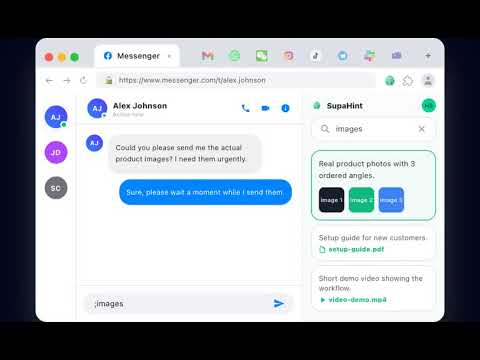
SupaHint - Smart Snippet Manager & AI Writing Assistant Write faster, draft smarter, and stay aligned with your team using SupaHint! SupaHint is a lightweight Chrome extension that helps you save, manage, and instantly insert snippets or canned responses as you type. Plus, it features a built-in AI assistant to help you rewrite and optimize your snippets before saving them. 🚀 FEATURES: 1. Personal & Team Snippet Memory: • Personal Memory: Keep your private templates, email snippets, or frequent replies in one place. • Team Memory: Share common templates across your team. Features a clean approval workflow (Member submits -> Owner approves -> Available for the whole team) to ensure consistent communication. 2. Fast Shortcut Trigger: • Type the ";" character (or use the shortcut) in any text input field on the web to instantly display your saved snippets. • Navigate using arrow keys (↑/↓) and press "Tab" or "Enter" to auto-fill—no more manual copy-pasting. 3. AI-Powered Rewrite Helper: • Easily save selected text from any web page. Use our built-in AI assistant to rewrite, polish, or summarize the text before saving it to your personal or team memory. 4. Intuitive Side Panel & Management: • Quick-access menu directly on input fields. • Use the Side Panel to easily search, view recent snippets, and manage your database without losing your workflow. 💡 EASY TO GET STARTED: • Step 1: Sign in to SupaHint and set up your snippets in the Dashboard. • Step 2: On any website, type ";" in an input box to load your snippets. • Step 3: Select with arrow keys and press "Tab"/"Enter" to insert. • Step 4: Highlight text on any page and right-click to save (and optionally rewrite with AI) directly to your memory. 🎯 WHO IS SUPAHINT FOR? • Customer Support & Sales: Reply to FAQs instantly with consistent messages. • Recruiter & Marketers: Quickly send outreach templates and follow-ups. • Anyone looking to reduce repetitive typing on their browser. 🛡️ SECURE & PRIVATE: We value your privacy. Your personal memory is secure and accessible only to you. SupaHint fully complies with the Chrome Web Store's safety standards. Install SupaHint now and speed up your daily writing!
0 out of 5No ratings
Details
- Version0.0.21
- UpdatedAugust 21, 2026
- Size371KiB
- Languages2 languages
- DeveloperWebsite
Email
support@supahint.com - Non-traderThis developer has not identified itself as a trader. For consumers in the European Union, please note that consumer rights do not apply to contracts between you and this developer.
Privacy

This developer declares that your data is
- Not being sold to third parties, outside of the approved use cases
- Not being used or transferred for purposes that are unrelated to the item's core functionality
- Not being used or transferred to determine creditworthiness or for lending purposes
Support
For help with questions, suggestions, or problems, visit the developer's support site