

SunoVid — Score to Picture in Suno Studio

Overview
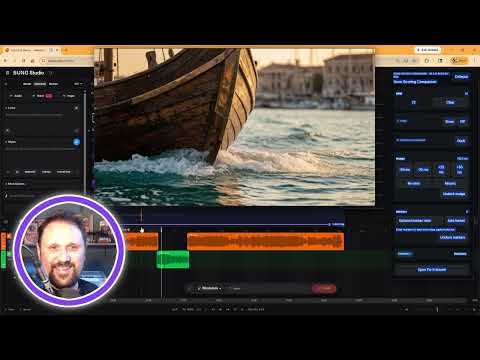
Sync a local video file with Suno Studio's transport. Nudge timing, drop markers, and score to picture — all without leaving Suno.
SunoVid is a companion extension for Suno Studio that lets you score music to picture — right inside your browser. Load any local video file, and SunoVid locks it to Suno's timeline. Press play in Suno, the video plays. Pause, it pauses. Scrub the timeline, the video follows. No alt-tabbing. No second DAW. Just one transport, one flow. WHAT YOU CAN DO: • Sync a local video to Suno Studio's transport controls • Frame-accurate nudge timing (±25ms / ±50ms) for tight sync • Drop timestamped markers with notes for hit points and cue notes • Set BPM for reference • Pick and pin Suno's play button and timecode display • Re-zero and resync with one click • Collapsible video panel and Picture-in-Picture mode • Waveform display with volume control for film audio BUILT FOR FILM COMPOSERS & MUSIC PRODUCERS: If you're using Suno to generate music for video — ads, short films, YouTube content, trailers — SunoVid gives you the visual reference you need without leaving the Studio workflow. HOW IT WORKS: 1. Open any project in Suno Studio 2. Click the SunoVid panel and load your video file 3. Pick Suno's play button and timecode display 4. Press play — video and Suno are now synced 5. Use nudge controls to dial in frame-perfect alignment PRICING: • 7-day free trial with full functionality • $6.99/month or $49/year — cancel anytime • Full details at sunovid.com Your video files never leave your computer. No upload, no streaming, no cloud processing of media. See our privacy policy at sunovid.com/privacy. Questions or feedback? support@sunovid.com
0 out of 5No ratings
Details
- Version0.5.5
- UpdatedSeptember 30, 2026
- FeaturesOffers in-app purchases
- Offered bySunoVid
- Size101KiB
- LanguagesEnglish
- Developer
Email
support@sunovid.com - Non-traderThis developer has not identified itself as a trader. For consumers in the European Union, please note that consumer rights do not apply to contracts between you and this developer.
Privacy

SunoVid — Score to Picture in Suno Studio has disclosed the following information regarding the collection and usage of your data. More detailed information can be found in the developer's privacy policy.
SunoVid — Score to Picture in Suno Studio handles the following:
This developer declares that your data is
- Not being sold to third parties, outside of the approved use cases
- Not being used or transferred for purposes that are unrelated to the item's core functionality
- Not being used or transferred to determine creditworthiness or for lending purposes