

Sum.Video - YouTube Summaries

Overview
Get AI-powered summaries for YouTube videos
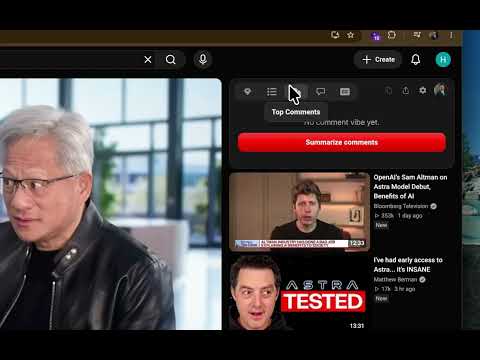
Don't skip through a 20-minute video looking for 2 bits of info. YouTube's own summary is one paragraph and basically useless. Sum.Video is the YouTube video summarizer that sits in a sidebar on youtube.com/watch — key insights, timestamps you can jump to, a full transcript, and chat. Click Summarize. No copy-paste into ChatGPT. No extra tab. Also on iPhone and Android: paste a link in the Sum.Video app when you're not at the desktop. Same account, same summaries. Top Features: ✅ Not a one-paragraph blurb: detailed key points in seconds — not YouTube's short AI recap. ✅ Key insights: see the main ideas without watching the entire video. ✅ Jump to the part you need: timestamps so you're not skipping through twenty minutes. ✅ Full transcript next to the player: read and search without copying captions into another tab. ✅ Chat about this video: ask for the steps, names, numbers, or the 2 bits you actually needed. ✅ Your language: summaries and translations in 17 languages — even when the video isn't in yours. ✅ Works when captions are missing: we check captions first; if they're messy or gone, we transcribe the audio. ✅ Free baseline that isn't a trap: 3 summaries a week — not one video then a paywall. 7-day unlimited trial for Pro. See what a video really covers before you spend an hour. Skip the fluff and the clickbait. Open a lecture, podcast, or long tutorial and get what you needed — then jump straight to it. Perfect for: • Lectures, homework, and studying • Podcasts and interviews • Tutorials and research • News, business, and tech • Anything longer than about 5 minutes How to Use: 1. Install the Sum.Video Chrome extension (or get the iOS / Android app at sum.video). 2. Open any YouTube video. 3. Click Summarize in the sidebar. 4. Read key insights, jump with timestamps, search the transcript, or ask chat. Chrome or phone — pick whichever fits. Desktop for the watch-page sidebar; mobile when you only have a link. FAQs: Q: How is this different from YouTube's built-in AI summary? A: YouTube's own summary is one short paragraph. Sum.Video gives you key insights, timestamped navigation, a full transcript, and chat — so you're not stuck with a generic blurb. Q: Does this YouTube summarizer have timestamps? A: Yes. Jump to the part you need instead of skipping through a 20-minute video for two bits of info. Q: Can I get a YouTube transcript next to the video? A: Yes. The full transcript stays in the sidebar on the watch page. Read and search it — no copying captions into ChatGPT. Q: What if YouTube captions are missing or messy? A: We check captions first. If they're missing or junk, Sum.Video transcribes the audio so you still get a transcript and summary. Q: Do I need ChatGPT to summarize a YouTube video? A: No. No copy-paste into ChatGPT or Claude. Click Summarize on youtube.com/watch. You sign in to Sum.Video for your quota — not to ChatGPT. Q: Can I summarize a YouTube video in my language? A: Yes. Summaries and translations in 17 languages, including when the video is in another language than yours. Q: Will this help with clickbait or long videos I might skip? A: Yes. Read the key points first to see what the video really covers, then jump to the useful parts — or skip the hour. Q: What if the summary misses steps, names, or details? A: Use chat about this video. Ask for the steps, numbers, or names instead of hoping a one-paragraph recap caught them. Q: Does it work for lectures, homework, podcasts, and tutorials? A: Yes. Students and professionals use it for lectures, study notes, interviews, and long tutorials — anything longer than about 5 minutes. Q: Is there a free YouTube summary extension plan? A: Yes. Logged-in users get 3 summaries per week. That's a real free baseline — not one video then a paywall. There's also a 7-day unlimited trial. Q: How much is Sum.Video after the trial? A: $39.90/year (~$3.33/month) or $4.99/month. Cancel anytime, including during the trial. Q: How do I cancel my subscription? A: Log in on sum.video, open your account, and cancel. You can cancel during the trial so you're not billed again by surprise. App Store / Play subscriptions cancel in your store account. Q: Do I have to leave YouTube? A: No. Summary, transcript, timestamps, and chat stay in the sidebar on the watch page. Or paste the link in the Sum.Video mobile app. Q: Is there a mobile app? A: Yes. iOS and Android at sum.video — paste a YouTube link, get the same insights and timestamps when you're away from Chrome. Q: What if the Summarize button disappears after a YouTube update? A: YouTube changes layout often; we ship extension updates when that happens. If the button is missing, update from the Chrome Web Store. If it still fails, contact support from sum.video. For more information, visit: https://sum.video Stop skipping through long videos for two bits of info. Install Sum.Video — Chrome sidebar or mobile app — and save time on lectures, podcasts, tutorials, and news.
0 out of 5No ratings
Details
- Version0.3.4
- UpdatedOctober 5, 2026
- FeaturesOffers in-app purchases
- Size623KiB
- LanguagesEnglish
- DeveloperQuestly Kereskedelmi és Szolgáltató Korlátolt Felelősségű TársaságWebsite
Téglagyártó út 21. 2. em. 20. ajtó Budapest 1203 HUEmail
peter@sum.videoPhone
+36 20 436 2425 - TraderThis developer has identified itself as a trader per the definition from the European Union and committed to only offer products or services that comply with EU laws.
- D-U-N-S301744809
Privacy

Sum.Video - YouTube Summaries has disclosed the following information regarding the collection and usage of your data. More detailed information can be found in the developer's privacy policy.
Sum.Video - YouTube Summaries handles the following:
This developer declares that your data is
- Not being sold to third parties, outside of the approved use cases
- Not being used or transferred for purposes that are unrelated to the item's core functionality
- Not being used or transferred to determine creditworthiness or for lending purposes
Support
For help with questions, suggestions, or problems, visit the developer's support site