

Summ-It

Overview
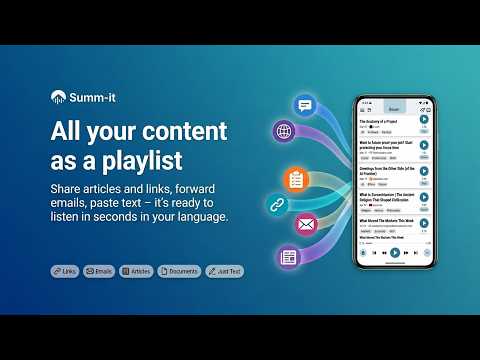
Save articles, PDFs & YouTube, then listen in your browser or on your phone. Full text or a short summary.
Everything you save, ready to listen. Click the Summ-it icon on any article, newsletter, or YouTube page and it lands in your queue. Press play right in your browser, or pick it up in the Summ-it app for iPhone and Android for the commute, the gym, or the dishes. The full article or a short summary, your choice on every item. SAVE FROM YOUR BROWSER • One-click save of the current page (or Ctrl+Shift+S / Cmd+Shift+S) • Save all open tabs at once, each page captured as you see it • Right-click menu: save a link, save as priority, save full content, or save just the selected text • Paste mode for URLs or raw text that doesn't extract cleanly • Upload PDF, TXT, or Markdown files (up to 25 MB) • Organize saves with labels to filter and find them in the app • Works in Chrome and other Chromium browsers such as Edge and Brave LISTEN IN YOUR BROWSER • Your whole queue in the extension, in playback order or newest first • Press play to listen in a browser tab with the natural AI voices • Search your library, or ask Summit a question about what you've saved • Share anything as a link: friends listen in their browser, no app needed ON YOUR PHONE • Full article or a short summary, switchable per item any time • Continuous auto-advancing queue, podcast-style • Background and offline playback, lock-screen controls, CarPlay and Android Auto • Speed control, rewind 15s / skip 30s • Listen in 30 languages • Catch Up: fold a backlog of older items into one short audio catch-up Beyond this extension, you can also save by forwarding emails to your queue, sharing from any app on your phone, or pasting text directly in the app. GET THE APP • Android: https://play.google.com/store/apps/details?id=app.summitapp • iPhone: https://apps.apple.com/app/summ-it/id6760028419 PRICING Free account includes 25 trial items. Paid plans add monthly items, translation, and more: Pro $7.99/month (100 items) and Premium $13.99/month (250 items) — Google Play pricing; App Store pricing may vary. One item = one summary or one full-audio generation, and nothing is charged if extraction fails. PRIVACY • No browsing history collected — only pages you explicitly save • Sign-in is used solely to sync saves to your account • No ads, and we don't sell your data Everything you meant to read, lined up and ready to play.
0 out of 5No ratings
Details
- Version1.4.1
- UpdatedOctober 26, 2026
- Offered byroizman
- Size258KiB
- LanguagesEnglish
- Developer
Email
roizman@gmail.com - Non-traderThis developer has not identified itself as a trader. For consumers in the European Union, please note that consumer rights do not apply to contracts between you and this developer.
Privacy

Summ-It has disclosed the following information regarding the collection and usage of your data. More detailed information can be found in the developer's privacy policy.
Summ-It handles the following:
This developer declares that your data is
- Not being sold to third parties, outside of the approved use cases
- Not being used or transferred for purposes that are unrelated to the item's core functionality
- Not being used or transferred to determine creditworthiness or for lending purposes
Support
For help with questions, suggestions, or problems, visit the developer's support site