

Subtitle Overlay

Overview
Subtitles on any web video, always in sync: translated into 31 languages, dual subtitles, your own style, sized to fit the player.
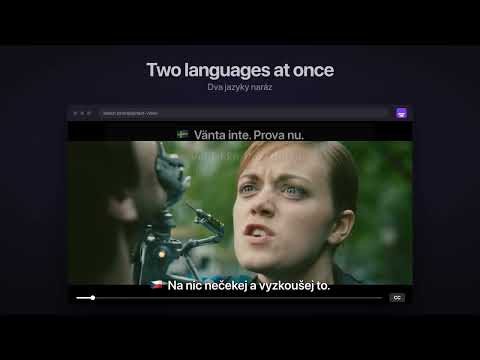
Watch any web video with subtitles in your language. Subtitle Overlay draws subtitles over the video player of any website, also in fullscreen, and keeps them in sync with the video: pause, seek and playback speed just work. Use the subtitles the site already has, translated into your language, or bring your own .srt or .vtt file. ★ THE HIGHLIGHTS ★ Any site, any video: subtitles over the player, in a window or fullscreen, always in sync ★ Translate into 31 languages in one click, or fully automatically as soon as you turn on subtitles in the site's player ★ Two languages at once: one at the top, one at the bottom, for watching together or learning a language ★ Finds the subtitles the page loads, YouTube included, so you rarely need a file at all ★ Your style: 1,800+ Google Fonts, outline, shadow, background box, size and position ★ Free, no ads, no account, no tracking ━━━━━━━━━━━━━━━━━━━━ TRANSLATE INTO 31 LANGUAGES • One click translates the loaded subtitles with Google Translate, right in the extension • Pick your language once; it stays your favourite for every Translate button • Automatic mode: turn on subtitles in the site's player and they appear over the video already translated, with a short "Translated to …" note instead of a pop-up • The site's own subtitles are hidden, so you never read two sets at once • Switch back to the original any time, or save the translation as an .srt file • Languages: Vietnamese, Czech, English, Slovak, German, French, Spanish, Italian, Portuguese, Polish, Hungarian, Ukrainian, Dutch, Swedish, Danish, Norwegian, Finnish, Greek, Turkish, Romanian, Croatian, Chinese (Simplified and Traditional), Japanese, Korean, Thai, Indonesian, Malay, Filipino, Hindi, Arabic TWO LANGUAGES AT ONCE • Turn on second subtitles in any language: English at the top for you, Vietnamese at the bottom for your partner • Or keep the original next to the translation, which is great for learning • Each set has its own distance from the edge • A small panel over the video turns each language on or off, next to its flag; the other one moves to the usual spot FINDS THE SUBTITLES A SITE LOADS • When a page loads subtitles (VTT files or streaming subtitle playlists), a small card offers them, with the film or episode title when the page shares it • YouTube: turn on CC and read the captions in your language; YouTube's own CC button switches them on and off, and the lines move up when the player controls appear • Show, translate or save them as .srt in one click • Several videos on one page? Pick which one the subtitles belong to STYLE THEM YOUR WAY • 1,800+ Google Fonts, filtered to the ones that have the letters of your language (č ř ž, ư ế ộ, Cyrillic, Greek, Japanese and more) • Size, weight, color, outline, drop shadow, background box (with optional blur behind it) and line width • At the bottom, in the middle or at the top of the video • Presets (Clean, Boxed, High contrast) plus your own saved looks • Text scales with the player, with a live preview in the popup • Hides sound labels like [Music] and the >> speaker marks (one switch brings them back) FIX THE TIMING • Shift subtitles earlier or later in 0.1 s or 1 s steps, from the popup or the keyboard • The shift is remembered with the page MADE FOR LEARNING • Missed a line? Alt + R plays it again from the start • Click any line to copy it, for a dictionary or your notes YOUR OWN FILE • Pick an .srt or .vtt file, or drag it straight onto the video • Broken letters? Automatic text encoding detection (also Japanese, Chinese and Korean files) with a manual override • Your subtitles come back when you reload the page or return to it later FULLSCREEN THAT KEEPS THE SUBTITLES • Alt + F or the button at the top of the video; F leaves it again • Subtitles step aside when a site menu or notification covers them SITE BY SITE • Turn it off on any site with one switch; the list of turned-off sites is one click away KEYBOARD SHORTCUTS Alt + [ / ] sync · Alt + Shift + [ / ] sync by 1 s · Alt + 0 reset sync · Alt + R repeat the line · Alt + S show or hide (pick your own shortcut) · Alt + ↑ / ↓ move · Alt + F fullscreen with subtitles INTERFACE IN 8 LANGUAGES English, Czech, Slovak, German, French, Spanish, Vietnamese and Chinese (Simplified). It follows your browser, or pick one at the bottom of the popup. FOR TINKERERS A "Subtitles" tab in DevTools lists every subtitle file the page loaded and saves it as .vtt or .srt. PRIVACY No accounts, no analytics, no tracking. Subtitle text is sent to Google Translate only when you translate. Remembered subtitles stay in your browser. Details in the privacy policy. SUPPORT THE CREATOR Subtitle Overlay is free and every feature stays free. If it makes your evenings better, the popup has a "Support the creator" page with Revolut, PayPal, Solana and Sui. Completely optional, and thank you! Created with 💜 by Cleedek in Vietnam. Screenshots show frames from Tears of Steel, © Blender Foundation, mango.blender.org, licensed CC BY 3.0.
0 out of 5No ratings
Details
- Version1.0.13
- UpdatedOctober 26, 2026
- Offered bycleedek@gmail.com
- Size126KiB
- Languages8 languages
- Developer
Email
Cleedek@gmail.com - Non-traderThis developer has not identified itself as a trader. For consumers in the European Union, please note that consumer rights do not apply to contracts between you and this developer.
Privacy

Subtitle Overlay has disclosed the following information regarding the collection and usage of your data. More detailed information can be found in the developer's privacy policy.
Subtitle Overlay handles the following:
This developer declares that your data is
- Not being sold to third parties, outside of the approved use cases
- Not being used or transferred for purposes that are unrelated to the item's core functionality
- Not being used or transferred to determine creditworthiness or for lending purposes