

Subtitle Overlay: Translate Video Subtitles with AI
2 ratings
)
Overview
Subtitles on any web video, in sync and in 31 languages. AI makes the translation sound natural, free on your own computer.
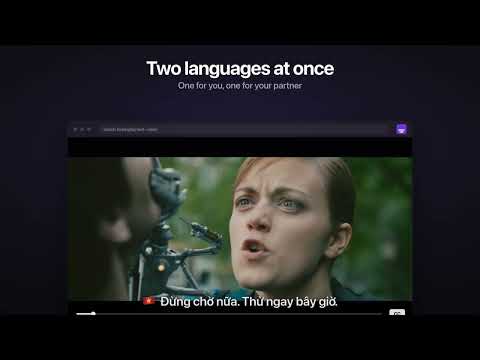
Watch any web video with subtitles in your language. Subtitle Overlay draws subtitles over the video player of any website, also in fullscreen, and keeps them in sync with the video: pause, seek and playback speed just work. Use the subtitles the site already has, translated into your language, or bring your own .srt or .vtt file. ★ THE HIGHLIGHTS ★ Any site, any video: subtitles over the player, in a window or fullscreen, always in sync ★ Translate into 31 languages in one click, or fully automatically as soon as you turn on subtitles in the site's player ★ NEW: shared subtitles: if someone already improved the same subtitles with AI, you get their version at once, and sharing yours is your choice ★ Make the translation sound natural with AI, free on your own computer (Gemma) or with your own Gemini, Claude or OpenAI key ★ If the site already has subtitles in your language, you get those, and translation steps in only when it doesn't ★ Two languages at once: one at the top, one at the bottom, for watching together or learning a language ★ Finds the subtitles the page loads, YouTube included, so you rarely need a file at all ★ Your style: 1,800+ Google Fonts, outline, shadow, background box, size and position ★ Free and open source: no ads, no account, no tracking, and every line of code is public ━━━━━━━━━━━━━━━━━━━━ TRANSLATE INTO 31 LANGUAGES • One click translates the loaded subtitles with Google Translate, right in the extension • Optional: click Improve and AI (Gemma on your computer, or Gemini, Claude or OpenAI) rewrites Google's quick version so it sounds natural (more below). Move the mouse over the video to see how far it got • Pick your language once; it stays your favourite for every Translate button • Automatic mode: turn on subtitles in the site's player and they appear over the video already translated, with a short "Translated to …" note instead of a pop-up. New installs start with it on, translating into your browser's language • If the site has subtitles in your language (YouTube and streaming sites), those come first; Google or AI only translate when there are none • The site's own subtitles are hidden while ours are on and come back as soon as you turn ours off • Switch back to the original any time, or save the translation as an .srt file • Languages: Vietnamese, Czech, English, Slovak, German, French, Spanish, Italian, Portuguese, Polish, Hungarian, Ukrainian, Dutch, Swedish, Danish, Norwegian, Finnish, Greek, Turkish, Romanian, Croatian, Chinese (Simplified and Traditional), Japanese, Korean, Thai, Indonesian, Malay, Filipino, Hindi, Arabic MAKE IT SOUND NATURAL (OPTIONAL) Google Translate is quick, but it goes line by line, word for word. Click Improve and an AI model rewrites the subtitles with the whole scene in mind, starting where you are watching. • Free: Gemma, Google's open model, runs on your own computer with Ollama or LM Studio, so the AI step stays on your computer. You need a fairly powerful computer and about 8 GB of disk space. • The popup walks you through it: install Ollama from ollama.com, then download Gemma with one click (it needs at least 16 GB of RAM). More about it and the model we recommend right now: cleedek.com/subtitle-overlay/ai • Or use your own API key: Gemini (has a free tier), Claude or OpenAI (paid). • Before it starts, it skims the whole file and notes who is who, so gender, forms of address and names stay the same from the first line to the last. • It never starts by itself: nothing runs and nothing is spent without your click. • Also for YouTube's automatic captions in your own language: Improve adds the punctuation and fixes misheard words, without translating. SHARED SUBTITLES • If someone already improved the same subtitles with AI and shared them, the card over the video offers their version, marked "Shared". One click on Use, and there's no waiting and no AI work on your computer • Looking for them is on from the start and sends only the first 5 characters of a one-way fingerprint of the subtitles plus the language, never the page, the video or its title. "Find subtitles from others" turns it off • "Use shared automatically" (off by default) takes a shared version without the click. Google's version is always one click away • Sharing your own stays off until you say yes on a card after an AI improvement. Only finished versions from a local model with 12B or more, or from a paid one, are offered. "Delete my shared subtitles" removes everything you shared in one click • A bad copy? "Report a problem" > "Translation is wrong" reports it, and three reports hide it TWO LANGUAGES AT ONCE • Turn on second subtitles in any language: English at the top for you, Vietnamese at the bottom for your partner • Or keep the original next to the translation, which is great for learning • Each set has its own distance from the edge • A small panel over the video turns each language on or off, next to its flag; the other one moves to the usual spot FINDS THE SUBTITLES A SITE LOADS • When a page loads subtitles (VTT files or streaming subtitle playlists), a small card offers them, with the film or episode title when the page shares it • YouTube: turn on CC and read the captions in your language; YouTube's own CC button switches them on and off, and the lines move up when the player controls appear • Show, translate or save them as .srt in one click • Several videos on one page? Pick which one the subtitles belong to TRANSLATION QUEUE AND SAVED SUBTITLES • Drop in several .srt or .vtt files, or click "Add to queue" on subtitles a site loads. They're translated one after another while you do something else; the queue tab can stay in the background • Works with Google, Gemini, Claude, OpenAI or your local model • While a file is in the queue, the card over its video shows how far it got, and the finished file replaces Google's lines on its own • Improved subtitles are kept in the extension for as long as you choose, and come back when you return to the video, and on any other page with the same subtitles, without asking the AI again • Play opens the video with its subtitles, "Show on…" puts them over a video already open in another tab, and Download saves the .srt STYLE THEM YOUR WAY • 1,800+ Google Fonts, filtered to the ones that have the letters of your language (č ř ž, ư ế ộ, Cyrillic, Greek, Japanese and more) • Size, weight, color, outline (with its own opacity), drop shadow, background box (with optional blur behind it) and line width • At the bottom, in the middle or at the top of the video • Presets (Clean, Boxed, High contrast) plus your own saved looks • Text scales with the player, with a live preview in the popup • A tidy popup with three tabs: Subtitles, Style and Behaviour, in a dark or light look (or follow your system) • Hides sound labels like [Music] and the >> speaker marks (one switch brings them back) FIX THE TIMING • Shift subtitles earlier or later in 0.1 s or 1 s steps, from the popup or the keyboard • The shift is remembered with the page MADE FOR LEARNING • Missed a line? Alt + R plays it again from the start • Click any line to copy it, for a dictionary or your notes YOUR OWN FILE • Pick an .srt or .vtt file, or drag it straight onto the video • Broken letters? Automatic text encoding detection (also Japanese, Chinese and Korean files) with a manual override • Your subtitles come back when you reload the page or return to it later FULLSCREEN THAT KEEPS THE SUBTITLES • Alt + F or the button at the top of the video; F or the "Exit fullscreen" button leaves it again • Subtitles step aside when a site menu or notification covers them SITE BY SITE • Turn it off on any site with one switch; the list of turned-off sites is one click away KEYBOARD SHORTCUTS Alt + [ / ] sync · Alt + Shift + [ / ] sync by 1 s · Alt + 0 reset sync · Alt + R repeat the line · Alt + S show or hide · Alt + 1 / Alt + 2 show or hide just one language · Alt + ↑ / ↓ move · Alt + = / Alt + − bigger or smaller · Alt + F fullscreen with subtitles Every shortcut can be changed or switched off in the Behaviour tab. INTERFACE IN 31 LANGUAGES English, Czech, Slovak, German, French, Spanish, Vietnamese, Simplified Chinese, Traditional Chinese, Italian, Portuguese, Polish, Ukrainian, Hungarian, Dutch, Swedish, Danish, Norwegian, Finnish, Greek, Turkish, Romanian, Croatian, Japanese, Korean, Thai, Indonesian, Malay, Filipino, Hindi, and Arabic (right to left). It follows your browser, or pick one at the bottom of the popup. FOR TINKERERS A "Subtitles" tab in DevTools lists every subtitle file the page loaded and saves it as .vtt or .srt. PRIVACY No accounts, no analytics, no tracking. Subtitle text is sent to Google Translate only when subtitles are translated (by your click or by automatic mode), and to Gemini, Claude, OpenAI or your local model only when you click Improve. To find shared subtitles, the first 5 characters of a one-way fingerprint of the subtitles and the language are sent to my server (subs.cleedek.com); your own improved subtitles go there only if you agree to share them. Remembered and saved subtitles otherwise stay in your browser. If you write to me with "Write to me" in the popup, your message reaches me by email. A problem report is sent only when you press Send and carries the site's name, never the page address. Details in the privacy policy. PROBLEM OR IDEA? Click "Problem or idea?" at the bottom of the popup and write to me. I read every message. Subtitles don't show on a site? The "Help" label on the video walks you through it, and "Report a problem" sends me the site's name so I can fix it. OPEN SOURCE The whole extension is open source (GPL-3.0), so anyone can check exactly what it does: github.com/Cleedek/subtitle-overlay. If you like it, a star on GitHub helps other people find it. SUPPORT THE CREATOR Subtitle Overlay is free and every feature stays free. If it makes your evenings better, the popup has a "Support the creator" page with Ko-fi and a few other ways to pay. After many translated videos, a small card over the video asks once too (on three videos at most; one click on it and it's gone for good). Completely optional, and thank you! Created with 💜 by Cleedek in Vietnam. Subtitle Overlay is an independent project. It is not affiliated with, endorsed by or sponsored by any of the websites or streaming services it works with. Support for them is our own work: we tested it on those sites and, on some of them, adapted it to their players. Names and logos of those services belong to their owners. Screenshots show frames from Tears of Steel, © Blender Foundation, mango.blender.org, licensed CC BY 3.0.
5 out of 52 ratings
Details
- Version1.1.0
- UpdatedNovember 12, 2026
- Offered bycleedek@gmail.com
- Size1.17MiB
- Languages32 languages
- Developer
Email
Cleedek@gmail.com - Non-traderThis developer has not identified itself as a trader. For consumers in the European Union, please note that consumer rights do not apply to contracts between you and this developer.
Privacy

Subtitle Overlay: Translate Video Subtitles with AI has disclosed the following information regarding the collection and usage of your data. More detailed information can be found in the developer's privacy policy.
Subtitle Overlay: Translate Video Subtitles with AI handles the following:
This developer declares that your data is
- Not being sold to third parties, outside of the approved use cases
- Not being used or transferred for purposes that are unrelated to the item's core functionality
- Not being used or transferred to determine creditworthiness or for lending purposes