

SubTalk: Dual Subtitles & English Learning

Overview
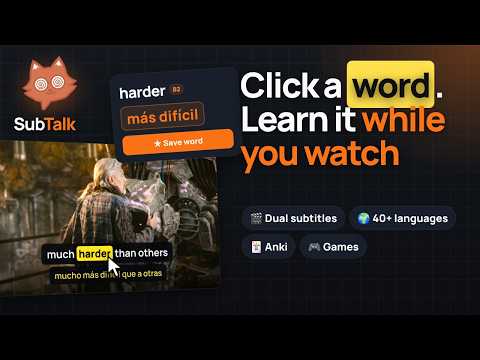
Learn English from any video: dual subtitles, one-click word translations, Anki cards and games.
SubTalk turns any video into a language lesson, with dual subtitles, instant word translations and a game-like progress system that keeps you coming back. Watch videos on popular streaming and learning sites, or almost any site with HTML5 video and subtitles. See the original line and the translation into your language at the same time, click any word and learn it without leaving the player. 🌍 LANGUAGES • Learn and translate between 40+ languages, from English and Spanish to Japanese and Ukrainian • Choose the subtitle language ("from") and the translation language ("to") separately • Extension interface: English, Ukrainian and Russian 🎬 DUAL SUBTITLES & INSTANT TRANSLATION • Dual subtitles: the original line and its translation shown together, right on the video • Pause and click any word for a translation that fits the context • Pronunciation, dictionary meaning and example sentences in one card • Two word-card layouts: classic vertical or a compact horizontal card that opens above the subtitles • AI-generated examples and an AI assistant for any word (bring your own API key) • Choose your translation engine and how the subtitles look: size, colours, background, width and fonts • Transcript panel to read and jump through the whole video • Extras for English: word level (A1–C2), phrasal verbs recognised as a single unit and a quick Cambridge Dictionary check 📚 BUILD YOUR VOCABULARY • Save words and whole sentences with one click, with the line they came from • Your own translations, example sentences and images for every word • Folders, filters, search and PDF export • Import your own dictionaries (ZIP, JSON or CSV) and your own word lists to highlight • Statistics on your saved words and daily progress 🎓 LEARNING MODE • Words before the episode: SubTalk picks the harder words from the video's subtitles so you can learn them first • Review after the video: short spaced-repetition sessions with the words you saved, no Anki needed 🃏 ANKI INTEGRATION • Connect Anki and turn saved words into flashcards in one click • Cards include the word, translation, example sentence and pronunciation • Create cards with an AI-written example or a blank card of your own • Review everything in Anki as usual — SubTalk just fills it for you 🎮 GAMES & PRACTICE • Six game modes for your saved words: Flashcards, Multiple choice, Type the translation, Match pairs, Odd one out and Listening • Optional timer for a bit of challenge 🏆 ACHIEVEMENTS, LEVELS & QUESTS • 200+ achievements with five rarity tiers, from Common to Mythic, plus secret ones • Levels with rewards, daily streaks and XP for everything you learn, including every new word you save • Daily and weekly quests, solo or together with friends • Weekly XP leaderboard with your friends • Share words with friends and compare progress 🎨 MAKE IT YOURS • Customise your profile with frames, animated backgrounds and titles • Unlock rare items from Mystery Boxes, craft new ones and collect them all • Several badge styles and many visual themes, including a minimalist one • Simple mode hides the extras for a clean, distraction-free experience • Pick the features you care about in a short setup on first launch and change them any time • Turn SubTalk off on any site or page with one click, or keep a list of sites where it never runs 🔒 YOUR DATA • Your word list is stored locally on your device • Sign-in is only needed for social features, quests with friends and cloud sync • Back up your settings and dictionary to a file at any time • Delete your account and all cloud data right from the extension (you have 30 days to change your mind) Learn languages the way you already enjoy: by watching.
5 out of 51 rating
Details
- Version1.0.11
- UpdatedNovember 17, 2026
- Size2.62MiB
- Languages4 languages
- DeveloperВіталій МарковськийWebsite
вулиця Келецька, 98 Вінниця, Вінницька область 21000 UAEmail
foxc9759@gmail.comPhone
+380 98 322 5100 - TraderThis developer has identified itself as a trader per the definition from the European Union and committed to only offer products or services that comply with EU laws.
Privacy

SubTalk: Dual Subtitles & English Learning has disclosed the following information regarding the collection and usage of your data. More detailed information can be found in the developer's privacy policy.
SubTalk: Dual Subtitles & English Learning handles the following:
This developer declares that your data is
- Not being sold to third parties, outside of the approved use cases
- Not being used or transferred for purposes that are unrelated to the item's core functionality
- Not being used or transferred to determine creditworthiness or for lending purposes
Support
For help with questions, suggestions, or problems, visit the developer's support site