


Overview
Schedule your Substack Notes to post automatically at any time.
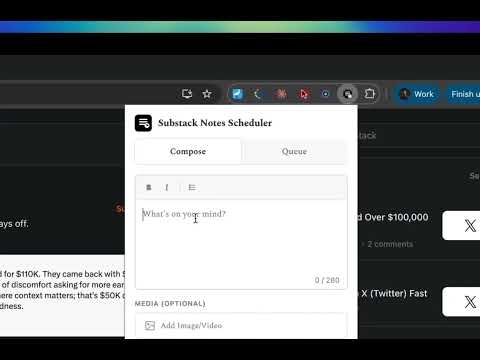
Schedule Substack Notes in advance. Compose, queue, and auto-post Notes with images so you stay consistent without being online. Substack doesn't let you schedule Notes. This extension fixes that. Write your Notes, pick a date and time, and they post automatically — even when you're away from your screen. What you can do: ✍️ Compose — Write Notes (280 char limit), attach images, and pick your posting time. 📋 Queue — See everything at a glance: scheduled, posted, failed. Cancel or retry with one click. 📝 Drafts — Save half-finished ideas. Edit and schedule them when you're ready. ⏰ Auto-post — When the time hits, the extension posts your Note via your logged-in Substack session. No third-party servers. No API keys. 🔁 Auto-retry — If a post fails, it retries up to 3 times with 5-minute delays so nothing gets lost. 🔢 Badge — See how many Notes are queued right from your toolbar icon. Why this exists: If you're serious about growing on Substack, you need to post Notes consistently — ideally multiple times a day. But you can't be online 24/7. This extension lets you batch your Notes in one sitting and drip them out throughout the day or week. Privacy first: All your data stays in your browser. Nothing is sent to any external server. Your Substack session is used locally to post — we never see or store your credentials.
0 out of 5No ratings
Details
- Version1.0.0
- UpdatedFebruary 27, 2026
- Size18.82KiB
- LanguagesEnglish
- DeveloperWebsite
Email
talhaasiif1999@gmail.com - Non-traderThis developer has not identified itself as a trader. For consumers in the European Union, please note that consumer rights do not apply to contracts between you and this developer.
Privacy

This developer declares that your data is
- Not being sold to third parties, outside of the approved use cases
- Not being used or transferred for purposes that are unrelated to the item's core functionality
- Not being used or transferred to determine creditworthiness or for lending purposes
Support
For help with questions, suggestions, or problems, visit the developer's support site