

Substack Bulk Downloader
1 rating
)
Overview
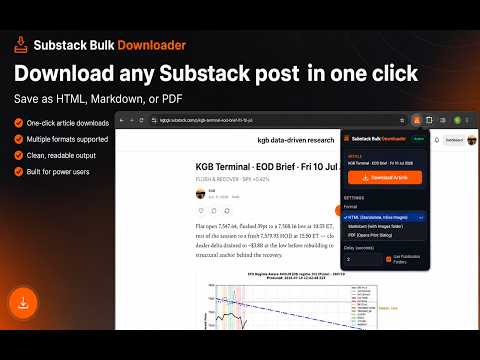
Download Substack articles as standalone HTML, Markdown, or PDF in bulk.
Substack Bulk Downloader - Product Description Download any Substack post or entire publication archives as clean, high-quality Markdown, HTML, or PDF files. One-click conversion, perfect offline rendering, and local media bundling. Substack Bulk Downloader is a premium, productivity-focused Chrome extension designed for readers, researchers, and archivists. It helps you save individual Substack posts or bulk-download entire publication histories with a single click. Safely preserve typography, layout structures, and embed images locally for a permanent, offline-ready personal library. Stop relying on messy screenshots or tools that strip out formatting. This extension extracts clean, high-fidelity files directly within your browser window. 🚀 Key Features 📥 One-Click Instant Download Save the current post instantly as a standalone HTML file, cleanly formatted Markdown, or a print-ready PDF using the unobtrusive social bar integration or floating action buttons. 📚 Batch Archive Download & Auto-Paging Back up entire publication feeds in bulk. The extension queries Substack's native backend REST APIs programmatically to scroll and page through chronological offsets in the background, extracting every article without requiring you to manually load the infinite scroll grid. 📅 Advanced Date Range Filtering Want only recent updates or a specific archive span? Input start and end date boundaries to target downloads. The background queue downloads matching articles and stops requests early once the timeline passes your start threshold. 📂 Structured Directory Organization Keep your filesystem structured automatically. The downloader saves content in a clean, nested layout: Downloads/Substack/[Publication]/[Date] [Headline]/ Markdown / HTML files are saved at the root of the article folder. Images are fetched cross-origin (bypassing CORS blocks), resolved to their correct extensions (.png, .jpg, .webp, .gif), and saved locally under a nested images/ directory, mapped via relative links. 🏷️ Flexible File Naming Style Customize how files are organized: Standard: [Pub Name] - YYYY-MM-DD - [Article Headline] Date First: YYYYMMDD [Article Headline] (Ideal for chronological file explorer sorting). All path names are passed to a strict Unicode alphanumeric sanitizer to prevent operating system path validation rejections. 🔐 Paid and Private Content Support Because the extension fetches articles from your active browser context, it carries your login session cookies. This enables seamless, high-fidelity extraction of any paid, premium, or private subscription content you have access to. 🎨 High-Fidelity Reader Rendering The standalone HTML exporter uses a customized, beautiful readability template (equipped with responsive typography, clear margins, and embedded base64 image data-URLs) optimized for offline viewing. PDFs are compiled with specific @media print style overrides to force content boundaries to fit perfectly without overflow page clipping. 🧭 How It Works Navigate to any Substack article or the publication's /archive page. Open the Bulk Downloader panel or click the Save Post buttons. Select your mode: Checked Checkboxes, All Archive, or Date Range. Watch files download sequentially with rate-limit delays to respect server capacities. 🔒 Privacy and Security 100% Local Execution: All extraction, cleaning, and file construction happen directly inside your browser. Zero Tracking: No third-party servers, analytics, tracking trackers, or telemetry. Access Integrity: Respects your subscription permissions, accessing only content you are actively logged in to read. 💡 Ideal For Newsletter Enthusiasts: Preserve newsletters you love before they go behind paywalls or get deleted. Researchers & Analysts: Keep local, text-searchable database caches of market analysis, trading journals, and long-form commentary. Students & Writers: Keep offline references of editorial and academic content with media attachments fully intact.
1 out of 51 rating
Details
- Version1.0.1
- UpdatedJuly 16, 2026
- Offered byKevinGBlackman
- Size52.05KiB
- LanguagesEnglish
- Developerblackmantrading.com
Margaret Avenue Diego Martin 150332 TTEmail
kevin@blackmantrading.com - Non-traderThis developer has not identified itself as a trader. For consumers in the European Union, please note that consumer rights do not apply to contracts between you and this developer.
Privacy

This developer declares that your data is
- Not being sold to third parties, outside of the approved use cases
- Not being used or transferred for purposes that are unrelated to the item's core functionality
- Not being used or transferred to determine creditworthiness or for lending purposes
Support
For help with questions, suggestions, or problems, visit the developer's support site