


Overview
Translate hovered subtitle words or phrases instantly on YouTube, Netflix and Udemy. No Tab Switching, No Interruptions!
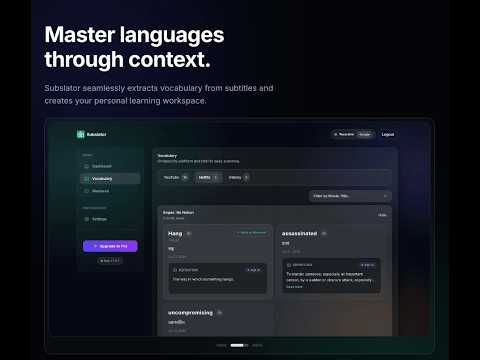
Subslator lets you translate subtitles and build your personal vocabulary instantly while watching videos on YouTube, Udemy and Netflix without pausing, switching tabs, or breaking your focus. Subslator makes language learning effortless. Just select a subtitle or phrase, see the translation immediately, and save it to your personal learning dashboard with a single click. Key Features ------------------------------- - Instant Translation: Select subtitles and get translations in real-time. - Save & Sync Vocabulary (NEW!): Bookmark new words and phrases directly from the video to your cloud dashboard. - Smart AI Dictionary (NEW!): Review your saved words in the dashboard to get AI-powered contextual meanings and real-life examples tailored to your language. - Track Your Mastery (NEW!): Monitor your learning progress and mark words as "Mastered" once you've learned them. - No Interruptions: Keep watching your video. No distractions. - No Tab Switching: Everything happens right where you are. - Multi-language Support: Translate between dozens of supported languages. - Simple & Lightweight: Fast performance with a clean, minimal interface. - Light and Dark Theme: Easy on the eyes, whatever your preference. How It Works ------------------------------- - Enable the extension and log in to your Subslator account. - Play any video on YouTube, Udemy or Netflix with subtitles turned on. - Highlight a word or phrase you don't know. - See the instant translation right on the screen. - Click the "Save" icon to add it to your personal vocabulary dashboard for later review! Who Is It For? ------------------------------- Language learners looking to pick up natural vocabulary from native speakers. Movie & series lovers who want to understand every line of dialogue. Developers and students watching tutorials in foreign languages. Why Subslator? Because switching tabs, copying text, and pasting into translators breaks your flow. Subslator keeps you completely focused on your video while secretly helping you build an incredible vocabulary.
4.7 out of 514 ratings
Details
- Version1.2.1
- UpdatedJuly 28, 2026
- Size199KiB
- LanguagesEnglish (United States)
- DeveloperWebsite
Email
sajibmehedi7@gmail.com - Non-traderThis developer has not identified itself as a trader. For consumers in the European Union, please note that consumer rights do not apply to contracts between you and this developer.
Privacy

Subslator - Selective Subtitle Translator has disclosed the following information regarding the collection and usage of your data. More detailed information can be found in the developer's privacy policy.
Subslator - Selective Subtitle Translator handles the following:
This developer declares that your data is
- Not being sold to third parties, outside of the approved use cases
- Not being used or transferred for purposes that are unrelated to the item's core functionality
- Not being used or transferred to determine creditworthiness or for lending purposes
Support
For help with questions, suggestions, or problems, please open this page on your desktop browser