

SubShelf — Smart YouTube Subscription Folders
28 ratings
)
Overview
Smart Subscription Category Folders & Feed Curator for YouTube™
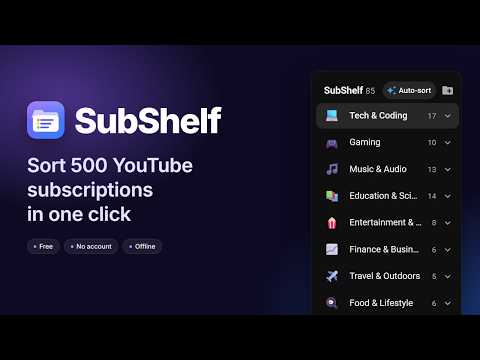
Transform your cluttered YouTube subscription feed into organized, themed category folders. Are you subscribed to 50, 100, or 500+ channels and tired of endless scrolling? SubShelf brings native-feeling category folders directly into your YouTube™ left sidebar and subscription feed. SubShelf is free, lightweight and privacy-first: no paywalls, no account, and no tracking. NEW IN 1.3.0: • Unsubscribing removes a channel from your folders instantly; resubscribing puts it back. • New subscriptions are added and sorted automatically. • Faster, more reliable sorting with Google Gemini Cloud. KEY FEATURES: • Smart Category Folders: Group channels into folders (Tech & Coding, Gaming, Music & Audio, Education & Science, Finance & Business, News & Politics and more, or your own) right inside YouTube's sidebar. • 1-Click Auto-Sort: Sorts all your subscriptions into folders in seconds, fully offline, using channel names and descriptions. Optionally uses Chrome's built-in on-device AI (only if Chrome already has it; SubShelf never downloads AI models) or Google Gemini with your own API key. • Learns From You: Every channel you move or drag teaches its folder, so similar channels follow on the next Auto-sort, including into folders you created. • Custom Feed Filtering: Click a folder to see only videos from its channels on your Subscriptions feed. More videos load automatically without moving your scroll position. • Folder Chips: Switch between folders from a chip bar above your Subscriptions feed (All · Tech · Gaming …). • Drag & Drop: Move channels between folders, or drag them straight from YouTube's own subscription list. • In-Sidebar Controls: Add channels with a searchable picker, remove channels (✕), and rename or delete folders from each folder's ⋯ menu, without leaving YouTube. • Stays in Sync: Unsubscribe from a channel anywhere on YouTube and it leaves your folders right away. Resubscribe within 30 days and it goes back into the same folder. New subscriptions are added and sorted automatically, and channels you unsubscribe from on another device or in the YouTube app are removed within a few hours. A partly loaded page can never wipe your folders. Channel avatars are filled in from YouTube. • Full Popup Manager: Search any channel, move it to another folder or take it out of all folders (it stays out until you place it again), and create, rename or delete folders from the extension popup. • Hide Shorts: One toggle removes the Shorts shelf and Shorts videos from your Subscriptions feed. • Private & Local: Your folders and settings are stored locally in your browser. No tracking, no ads, and no SubShelf servers. • Backup & Restore: Export and import your folders as a JSON file to move your setup to another computer (your API key is never included). PRIVACY & PERMISSIONS: SubShelf asks only for what it needs: • Storage: Saves your folders, channel assignments and settings locally on your device. • Offscreen: Used only to run Chrome's on-device AI in a hidden extension page if you turn it on. It runs entirely on your device and never downloads a model. • Host permission (https://www.youtube.com/*): Shows the folder sidebar and filters the Subscriptions feed on YouTube. SubShelf runs on no other site. • Optional host permission (https://generativelanguage.googleapis.com/*): Not granted at install. Chrome asks for it only if you choose Google Gemini Cloud with your own API key. Channel names, handles and short descriptions are then sent to Google using your key. LEGAL DISCLAIMER: SubShelf is an independent, source-available project and is not affiliated with, sponsored by, or endorsed by Google LLC or YouTube. YouTube™ is a trademark of Google LLC.
5 out of 528 ratings
Details
- Version1.3.0
- UpdatedOctober 22, 2026
- Offered bySubShelf
- Size89.42KiB
- LanguagesEnglish
- Developer
Email
subshelf.app@gmail.com - Non-traderThis developer has not identified itself as a trader. For consumers in the European Union, please note that consumer rights do not apply to contracts between you and this developer.
Privacy

SubShelf — Smart YouTube Subscription Folders has disclosed the following information regarding the collection and usage of your data. More detailed information can be found in the developer's privacy policy.
SubShelf — Smart YouTube Subscription Folders handles the following:
This developer declares that your data is
- Not being sold to third parties, outside of the approved use cases
- Not being used or transferred for purposes that are unrelated to the item's core functionality
- Not being used or transferred to determine creditworthiness or for lending purposes