

Subnoted
ExtensionCommunication10 users

Overview
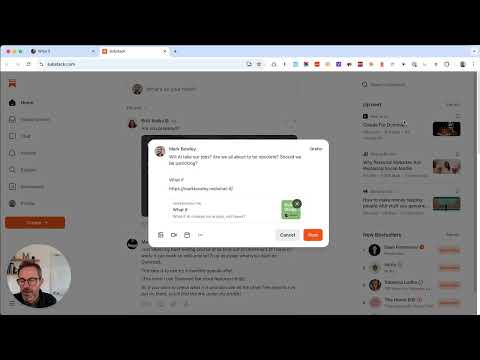
Clip selected text to a Substack Note draft – Subnoted
Subnoted is a simple web clipper for Substack writers. Find something worth sharing? Highlight the text, click the extension icon, and it drops straight into your Notes composer – page title, source URL, and all. No copying and pasting between tabs. No losing the link. No context switching. Just clip, edit and post. Works on any webpage, in Chrome. You write the Note – Subnoted just gets the content there, ready for you to post.
0 out of 5No ratings
Details
- Version1.0.3
- UpdatedJuly 30, 2026
- Offered byBowley
- Size11.25KiB
- LanguagesEnglish (United States)
- DeveloperMark Nicholas Bowley
130 Links Way Croxley Green Rickmansworth WD3 3RN GBEmail
mnbowley@gmail.comPhone
+44 7725 817012 - TraderThis developer has identified itself as a trader per the definition from the European Union and committed to only offer products or services that comply with EU laws.
Privacy

Manage extensions and learn how they're being used in your organization
The developer has disclosed that it will not collect or use your data. To learn more, see the developer’s privacy policy.
This developer declares that your data is
- Not being sold to third parties, outside of the approved use cases
- Not being used or transferred for purposes that are unrelated to the item's core functionality
- Not being used or transferred to determine creditworthiness or for lending purposes
Support
For help with questions, suggestions, or problems, please open this page on your desktop browser