

SubDeck: YouTube Subscription Manager

Overview
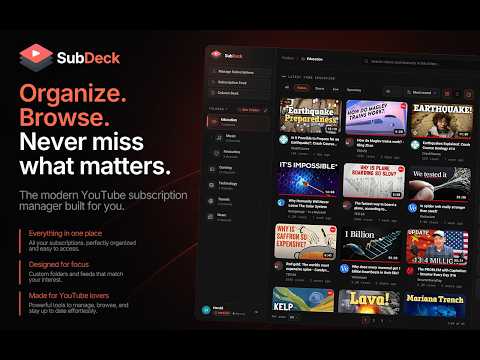
Organize YouTube subscriptions into folders and browse their uploads in a custom feed or multi-column deck.
YouTube gives you one endless subscription feed. Subscribe to enough channels and the ones you actually care about get buried under the ones you do not. SubDeck gives your YouTube subscriptions a better way to stay organized. Create folders, build custom feeds, filter content, and arrange channels side by side in a column deck, all without leaving YouTube. FEATURES ▸ Folders Organize your subscriptions by topic, interest, or however you want. Create as many folders as you like, with over fifty built-in icons to make them easy to recognize. ▸ Column Deck Pin folders and channels side by side and scroll each column independently, giving you a TweetDeck-style way to follow multiple feeds at once. ▸ Subscription Feed See your subscriptions in one place with options to filter content, hide watched videos, and switch between grid and compact list views. ▸ Content Filters Focus your feeds on videos, Shorts, live streams, or upcoming streams. ▸ Hide Watched Automatically hide videos you've already watched based on a configurable watched threshold. You can also mark videos as watched without playing them or save them to Watch Later. ▸ Manage Subscriptions Manage all your channels from one place. Sort, filter, organize, and unsubscribe from multiple channels at once. ▸ Search inside folders Search for videos and channels within a specific folder instead of searching across all of YouTube. ▸ Add channels without subscribing Add a creator to a folder using a channel URL, @handle, or channel ID without subscribing to them. ▸ Export and Import Save your folders to a .json file and move them to another browser. Importing merges with your existing folders and never deletes anything. ▸ Coming from PocketTube Already organized your subscriptions in PocketTube (YouTube Subscription Manager)? Export your data there and import that file into SubDeck. Your folders and the channels in them come with you. FREE TO USE SubDeck is free to use with no account required. The free plan includes unlimited folders and the core organization and browsing features. It includes up to 2 deck columns and 15 mark-as-watched actions per day. Premium through Patreon lifts those limits and unlocks subfolders three levels deep, channel sorting by latest upload or subscriber count, custom folder colors and icons, folder duplication, and a one-click activity check across every channel. Premium members also get every new Premium feature we add in the future. PRIVACY SubDeck has no analytics, telemetry, advertising, or tracking. Your folders are stored locally in your browser. No account is required to use the extension. Optional Patreon membership verification is only used when you choose to connect Patreon. Full privacy details: https://subdeck.pages.dev/privacy.html FAQ Do I need an account? No. SubDeck works with the YouTube account you are already signed into. There is no sign-up, and nothing to create. How many folders and channels can I add? As many as you like. Folders are unlimited on both plans, and there is no cap on the channels a folder can hold. Can I use SubDeck without a Premium membership? Yes. The free plan includes unlimited folders and the core organization and browsing features. Premium adds subfolders up to three levels deep, removes the deck column and mark-as-watched limits, and unlocks additional organization features. FOLLOW SUBDECK Website: https://subdeck.pages.dev/ Patreon: https://www.patreon.com/0xHPZ YouTube: https://www.youtube.com/@SubDeckApp Not affiliated with, endorsed by, or sponsored by YouTube or Google.
0 out of 5No ratings
Details
- Version1.2.2
- UpdatedOctober 6, 2026
- Offered by0xHPZ
- Size330KiB
- Languages4 languages
- Developer
Email
zeerohpz@gmail.com - Non-traderThis developer has not identified itself as a trader. For consumers in the European Union, please note that consumer rights do not apply to contracts between you and this developer.
Privacy

SubDeck: YouTube Subscription Manager has disclosed the following information regarding the collection and usage of your data. More detailed information can be found in the developer's privacy policy.
SubDeck: YouTube Subscription Manager handles the following:
This developer declares that your data is
- Not being sold to third parties, outside of the approved use cases
- Not being used or transferred for purposes that are unrelated to the item's core functionality
- Not being used or transferred to determine creditworthiness or for lending purposes