

SubChat — AI side-chat with memory

Overview
Highlight text and ask focused follow-ups — plus Web Mind, your private on-device persona across every AI and website.
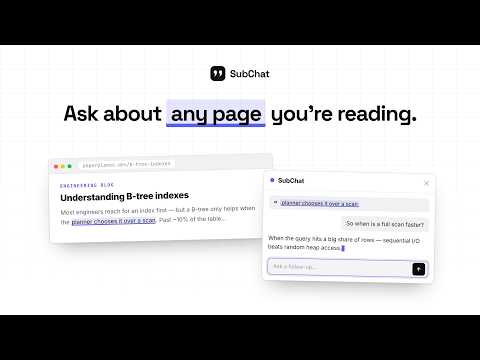
Ever asked a follow-up mid-answer and watched the conversation wander off the thing you were actually working on? SubChat fixes that. Highlight any line, click Ask, and a small side-chat opens right there. Your main conversation stays exactly where it was. It runs on the AI session you are already signed into. No API key to paste, no per-token charges, no account with us — because there is no server of ours in the middle. Your text goes from your browser straight to the AI you are already using. HOW IT WORKS • Highlight text in a reply, on a docs page, in a pull request — anywhere. • Click Ask. A focused side-chat opens over the page. • Ask as many follow-ups as you want, then close it. The thread disappears. • On claude.ai the side-chat is a real hidden conversation on your own account, tidied away automatically when you close the widget. FREE, AND PRO • Free covers claude.ai and gemini.google.com: one side-chat at a time, up to 10 a day, seeded with your selection. • Pro unlocks unlimited and simultaneous side-chats, context modes (nearby turns, whole chat, full page), saved searchable history, Keep & Continue in Claude, web mode on ChatGPT and non-AI websites, a configurable engine order, per-chat model selection, web search and file attachments, and Web Mind's advanced on-device persona, Context Vault and Workspaces. WEB MIND — OPTIONAL, AND OFF BY DEFAULT Web Mind is a private memory that makes every new chat start already knowing your context: how you like answers written, what you are working on, what is in the documents you added. It is switched off when you install. Nothing is captured until you choose a learning mode, and you can pause it, block individual sites, review every memory, and delete everything in one click. • Off — learn nothing new. This is the default. • Save only — just the things you explicitly click Remember on. • Conversations (Pro) — also learn from your Claude, ChatGPT and Gemini chats. • Full context (Pro) — also reading signals, text you submit, and a coarse topic-level navigation graph. Browser navigation access is requested separately and removed when you switch the sensor off. Everything is encrypted on your device with a key that never leaves it. Nothing is uploaded to us, because there is nowhere to upload it to. Passwords, payment fields and government IDs are never learned. Incognito is excluded. A scrubber redacts secrets and high-entropy tokens before anything is stored. CONTEXT VAULT Add a résumé, a contract, a spec, or an exported chat history. SubChat indexes it locally and pulls the relevant passage into an answer, showing which source it came from. PDF, DOCX, TXT and Markdown are supported. Scanned image-only PDFs cannot be read, and SubChat tells you rather than failing quietly. PRIVACY, PLAINLY • No SubChat server. No analytics. No trackers. No account. • Requests go to the AI provider you are already signed into, or to your own API key if you chose to add one. • Saved history and Web Mind records stay in your browser. • Uninstalling removes local data with it. Full policy: https://subchat.sohamaggarwal.com/privacy NOT AFFILIATED SubChat is an independent project and is not affiliated with, endorsed by, or sponsored by Anthropic, OpenAI or Google. "Claude", "ChatGPT" and "Gemini" are trademarks of their respective owners, used here only to describe compatibility.
0 out of 5No ratings
Details
- Version5.2.0
- UpdatedAugust 17, 2026
- FeaturesOffers in-app purchases
- Offered byaggarwalsoham3
- Size322KiB
- LanguagesEnglish
- Developer
Email
aggarwalsoham3@gmail.com - Non-traderThis developer has not identified itself as a trader. For consumers in the European Union, please note that consumer rights do not apply to contracts between you and this developer.
Privacy

SubChat — AI side-chat with memory has disclosed the following information regarding the collection and usage of your data. More detailed information can be found in the developer's privacy policy.
SubChat — AI side-chat with memory handles the following:
This developer declares that your data is
- Not being sold to third parties, outside of the approved use cases
- Not being used or transferred for purposes that are unrelated to the item's core functionality
- Not being used or transferred to determine creditworthiness or for lending purposes